
Orders & Payments
Orders & Payments
Track order fulfillment and payment collection in Pi-Square.
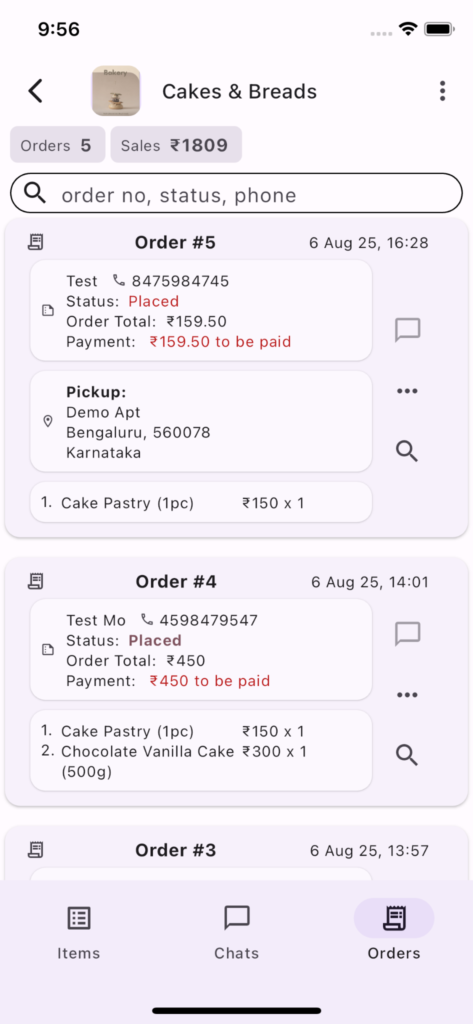
Orders and Payments can be managed on the Orders screen
Fulfillment Status
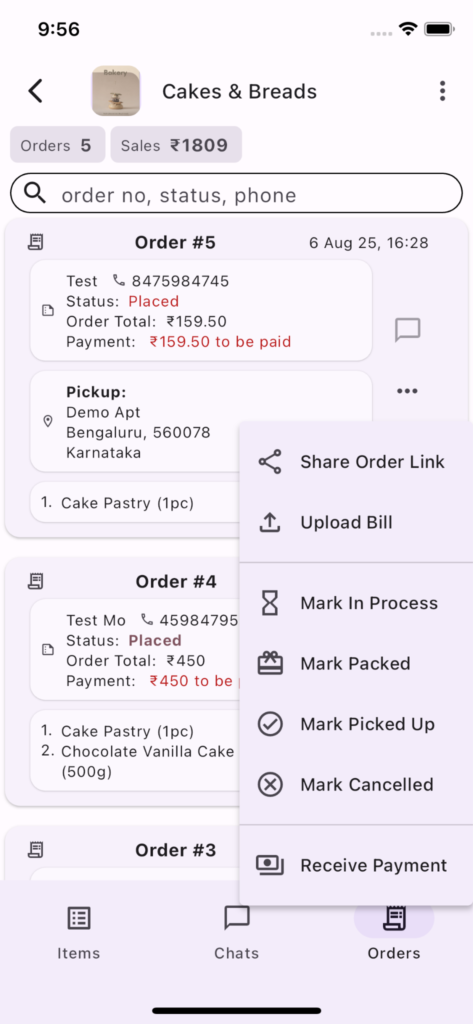
Orders can have the following fulfillment status
Physical Products
- Pending (Payment)
- Placed
- In Process
- Packed
- Dispatched
- Cancelled
- Delivered
- Picked Up
Digital / Service Products
- Pending (Payment)
- Placed
- Processed
- Cancelled
These help you keep track of the status of different orders. You can choose to use all or some of the statuses.
Cancelled is final state and no further change of state is possible.
Pending state is used only when advance payment percentage is > 0 and the payment does not succeed for some reason while placing the order. Once the required advance payment is made, order status changes to placed.
Billing
Bill upload option is available to share electronic copy of bill with the customer.
Offline or Manual Orders
Offline or Manual Order option is available right above the Settings option. Manual order allows you to place an order on behalf of a customer. Manual order flow is same as online order flow with the difference that you will be asked to input billing name and billing phone number as additional information. One more difference is that manual order allows you to choose between delivery & pickup regardless of these settings for online order.
Online Orders
When order is placed using the link it is termed as an online order.
Payments
Payments can be managed in two ways 1) Manual Tracking or 2) Automatic Tracking
Manual Tracking (Use UPI ID)
Manual Tracking means you ask customers to pay to you using UPI or cash or other means and you manually keep track of payment for each order and accordingly mark the payment status of each order in the system.
For this you just need to provided UPI ID in the Link Settings.
This is FREE of cost and works well when you receive small number of online orders.
Limitation: customer experience is not good as they need to scan the QR or copy the UPI ID to make the payment. Also, link owner/staff needs to manually confirm the payment.
This is reasonable method for businesses selling locally, but if you are selling pan India this is not a recommended approach.
Automatic Tracking (Use Payment Gateway)
Automatic Tracking of payments requires payment gateway integration and also costs payment gateway fees (which is typically 2% of the order value). Benefit outweighs the cost if you receive large number of online orders. Payment gateway also helps customer to pay using a method of their choice, like upi, credit card, net banking etc.
We are integrated with Razorpay and Cashfree, you will need payment gateway account with one of these to automate payments on Pi-Square. You will be able to integrate payment gateway by going to Link Settings.
If you need any help or need to use another payment gateway please contact us.
Note: payment integration is allowed only after you create the Link. Integrating payment gateway also overrides any UPI ID setting.
Advance Payment
You can specify advance payment percentage in Link Settings. If advance payment percentage is > 0, customer is directed to make the payment when they try to place the order. In case the payment fails for any reason, order is created in pending state.
Note: Customers generally prefer payment on pickup or delivery.