
Blog
WhatsApp Commerce: What It Is and How to Start Selling
WhatsApp commerce explained: how selling inside chats works, how to set it up, real use cases, limits and how to choose a platform.
Published November 26, 2026
WhatsApp commerce is the practice of selling products and services through WhatsApp. Customers browse a catalog, ask questions, place orders and often pay without leaving the chat or the link you send them. You will also see it called WhatsApp e-commerce, chat commerce or e-commerce through WhatsApp. For a small seller, it replaces screenshots, voice notes and “what is your address?” messages with one organized flow from the first question to the delivered order.
This guide explains why WhatsApp commerce matters, how to set it up step by step, which use cases fit which kinds of business, and what benefits and limits to expect. It also shows how to choose a WhatsApp commerce platform and which mistakes to avoid. A worked example in rupees lets you judge what chat-based selling could be worth to your own business.
Pi-Square is built for sellers who already take orders on WhatsApp, so the advice here is practical for bakeries, home businesses, event hosts and service providers. You stay in the chat your customers know, and you get the order management, payments and follow-up that a chat alone cannot give you.
Why WhatsApp commerce matters for your business
WhatsApp commerce matters because it closes the gap between a customer saying “I am interested” and that customer paying. Your buyers already use WhatsApp every day, so you sell in a place that needs no new habit, no download and no account.
Your buyers are already in the chat
WhatsApp has more than 2 billion users, and for many shoppers it is the app they open before any shopping site. When someone sees your product on Instagram or in a neighbor’s status, the natural next step is to message you. Asking that person to install an app or create an account costs you sales at the moment they are warmest. A WhatsApp chat or a plain link opens in seconds.
Chat also builds trust in a way that checkout forms do not. A customer can ask “is this fresh today?” or “can you deliver by 6 pm?” and get a human answer. That conversational layer is what separates chat commerce from a standard online store, and it is why many small shops sell more in chat than on their own website.
What manual chat selling costs you
Most sellers start by typing prices into chats. It works until volume grows, and then the same problems appear:
- Orders scatter across dozens of chats and get buried by newer messages.
- Payment confirmations arrive as screenshots that you match to orders by hand.
- Addresses and quantities are retyped, which causes errors.
- Bills and GST invoices are made separately, or not at all.
- Customers who go quiet are never followed up.
- You suggest an add-on only when you remember to.
The table shows how the same tasks look once the chat is backed by a proper setup.
| Task | Manual chat selling | Organized WhatsApp commerce |
|---|---|---|
| Taking orders | Scroll through chats | One order list with a fulfillment status |
| Payments | Screenshots matched by hand | Gateway payments or tracked cash and UPI per order |
| Invoices | Typed or made separately | Generated per order |
| Add-ons | Depends on memory | Suggested during ordering |
| Follow-up | Rare | Abandoned carts and repeat buyers identified |
Chat selling does not fail because of the chat. It fails because nothing organizes what happens after the message.
Why it is a growth channel and not just a convenience
Order capture is only the start. Because the conversation is live, you can suggest a combo, an upgrade or a related item right when the customer is deciding. That raises average order value without extra ad spend. A seller with a clear record of past orders can also bring buyers back, which lifts repeat orders, the cheapest sales a small business makes.
How to start selling with WhatsApp commerce
To start WhatsApp commerce, pick a selling model, build a catalog with clear prices, decide how customers pay, and share your link where buyers already find you. You can finish a first version in an afternoon and refine it as real orders arrive.
Pick the selling model that fits your volume
There are three common ways to sell on WhatsApp. Each suits a different stage of business, and many sellers combine them.
| Model | How it works | Best for | Watch out for |
|---|---|---|---|
| WhatsApp Business app catalog | Free app with a catalog of up to 500 items. Customers browse and message you their order. | Solo sellers with a few orders a day | Everything after the order is manual |
| WhatsApp Business Platform via a provider | API-based setup with automation, message templates and multiple agents. Meta charges per message, depending on country and message type. | Larger teams with high chat volume | Setup effort, template approval, message costs |
| Link-based store shared on WhatsApp | Catalog, checkout and payments sit behind a link. Chat stays for questions and orders. | Small and growing sellers who want organized orders | You must share the link consistently |
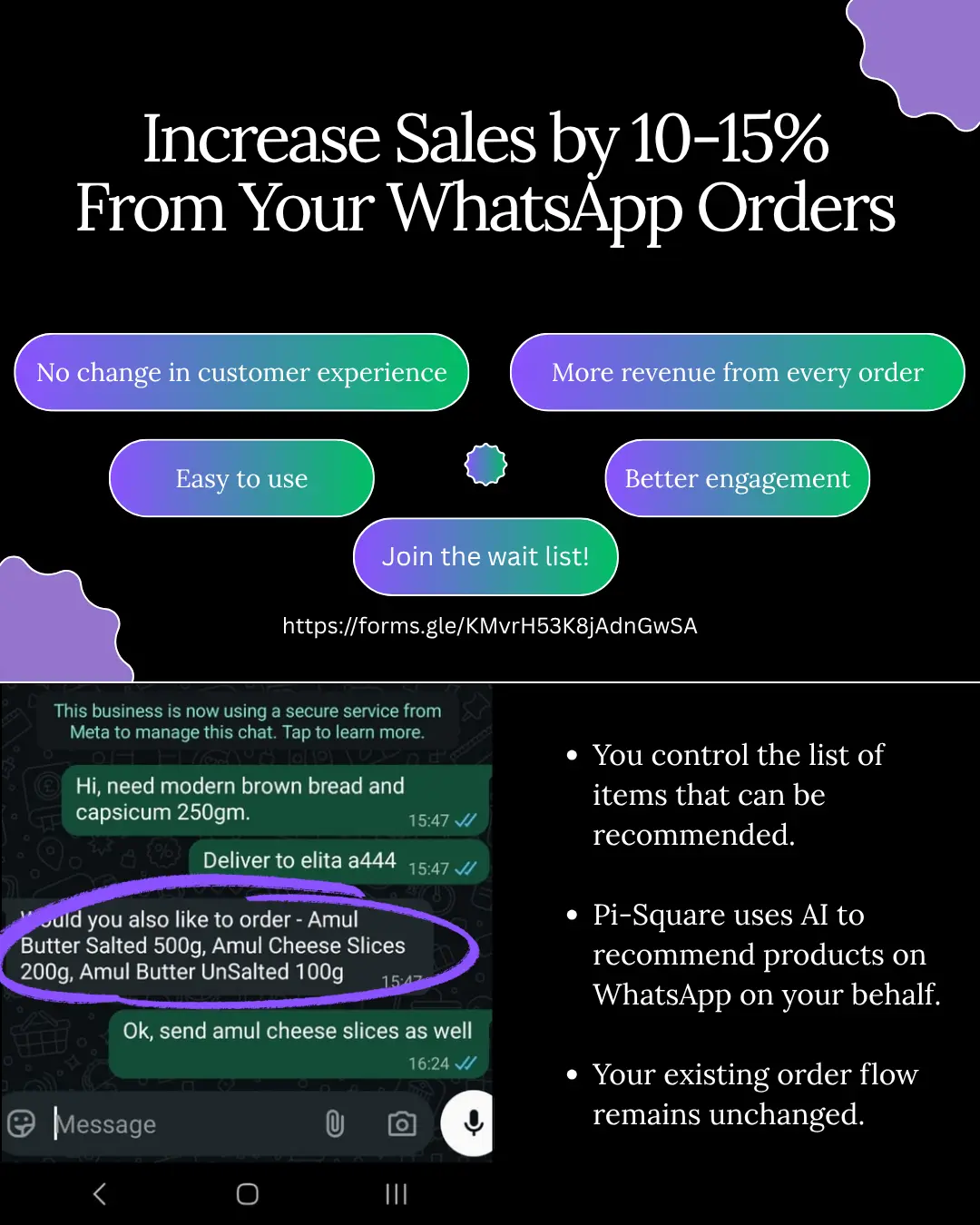
Pi-Square follows the third model. You create a commerce link, and customers need no app. They can keep ordering on WhatsApp, or place direct orders through the link if you enable that flow. If you later connect your WhatsApp Business account, you can add WhatsApp upsells on top.
Set up your store in six steps
A first working setup takes these steps:
- Create your commerce link in the Pi-Square mobile or web app. No technical knowledge is needed.
- Add your items with photos, prices, variants and add-ons such as gift packing or custom notes.
- Choose how orders arrive: through WhatsApp, directly through the link, or both.
- Set up payments: connect a payment gateway, or track cash, UPI and other modes manually.
- Turn on invoices and inventory: set up GST invoices in settings and mark items available or unavailable as stock changes.
- Place a test order yourself, from a customer’s phone, before you tell anyone.
The test order is the step most sellers skip. It shows you the exact experience your buyer gets, including any confusing wording in item names or delivery notes.
Share the link where buyers already look
Put your link in your WhatsApp Business profile, your status, your Instagram bio and any printed material such as packaging, menus or counter cards. Every place a buyer might ask “how do I order?” should answer with the same link.

Choose the link name carefully. On Pi-Square, if you change a link name, the old link stops working and someone else can claim it. A short, memorable name that you never change is worth more than a clever one.
Start with one catalog and one link, then add automation after real orders show you where customers get stuck.
WhatsApp commerce use cases with examples
WhatsApp commerce fits any business that already takes orders or requests by message. The pattern is the same everywhere: the chat handles the conversation, and a link or catalog handles the structured part such as items, dates and payment.
Product sellers: food, groceries, gifts and clothing
Home bakeries, local grocers, gift sellers and clothing boutiques gain the most, because their customers already order by message. Customers send a list or pick items from the link, and the seller confirms and collects payment. Variants, add-ons and custom notes matter here: “no nuts”, “message on the cake” and “gift wrap” belong in the order, not buried in chat.

Here is a worked example for a home bakery on the Pro plan. Assume it receives 100 orders a month at an average of ₹800. Assume a WhatsApp upsell suggests a ₹120 box of cookies and 25 customers add it. These figures are illustrative, not a promise.
| Item | Amount |
|---|---|
| Base orders (100 × ₹800) | ₹80,000 |
| Additional sales from upsells (25 × ₹120) | ₹3,000 |
| Upsell charge (10% of additional sales only) | ₹300 |
| Net gain after the charge | ₹2,700 |
The charge applies only to the extra revenue, so a customer who ignores the suggestion costs you nothing.
Bookings, events and services
Event organizers, class hosts and pop-up sellers use the same setup for tickets, registrations, stall bookings and advance payments. Instead of collecting names and payment screenshots in a chat, the buyer picks a slot or ticket on the link and pays. You see a clean list of who is coming.
Service providers such as consultants, clinics and home-service businesses often do not want a forced checkout. For them, a link that shows services and lets people enquire or book suits better. The chat then handles questions like “do you cover my area?” before the booking.
Digital items, donations and growing D2C brands
Sellers of digital goods, memberships, passes and donations can collect payments through a link and keep in touch with supporters or buyers over chat. Check WhatsApp’s policy before you list certain digital content in a WhatsApp catalog itself, because some categories are restricted there. A link-based store avoids that limitation for what you sell on your own page.
D2C brands often start with chat selling and social media. As orders grow, they move to a branded store with a custom domain while customers continue to message them. The chat habit does not break. It simply gains an organized store behind it.
The best use case is the one where customers already message you before they buy.
Benefits and limits of WhatsApp commerce
WhatsApp commerce gives small sellers faster orders, higher order values and more repeat buyers. It also runs inside rules set by WhatsApp, and it needs tooling once volume grows. Weigh both sides before you build on it.
Benefits you can expect
The gains are practical and show up in the first month:
- Fewer steps to purchase. Buyers go from question to order in one thread, or one tap on a link.
- Higher order value. Suggested add-ons, combos and upgrades raise the basket size.
- More repeat orders. Past buyers are easy to message, and a record of their orders tells you what to offer.
- Low cost to start. You can begin on a free plan and pay only when volume demands more.
- Personal service at scale. Customers get quick, human answers, which small sellers do better than large stores.
Order value usually matters most. A small rise in average order value applies to every order, so it compounds faster than any single discount.
Rules you must follow
WhatsApp’s business and commerce policies apply to every seller. Read the current WhatsApp Business policy before you scale, and keep these points in mind:
- Get permission first. Message only people who have shared their number and agreed to hear from you, and honor any request to stop.
- Respect the reply window. On the Business Platform, you can reply freely for 24 hours after a customer’s message. After that, you need an approved message template.
- Avoid restricted categories. Items such as alcohol, tobacco, drugs, weapons, gambling and adult content are not allowed in WhatsApp commerce.
- Own your transactions. WhatsApp does not process payments or fulfill orders for you. You are responsible for sales terms, delivery and applicable taxes.
Treat opt-in and restraint as part of your brand. Account suspension costs far more than a skipped broadcast.
Where WhatsApp alone falls short
WhatsApp is a messaging app, so it has no order list with statuses, no stock counts, no invoices and no sales dashboard. Payment tracking and inventory end up in notebooks or spreadsheets. Once you pass a few dozen orders a month, a WhatsApp commerce platform that sits beside the chat becomes necessary, not optional.
How to choose a WhatsApp commerce platform
Choose a WhatsApp commerce platform by looking at how you sell today, how many orders you handle, and what happens after the order arrives. Pick the tool that organizes the work after the chat, because that is where small sellers lose time.
What to check before you commit
Use this table as a checklist when you compare any WhatsApp e-commerce app or platform.
| Need | What to look for |
|---|---|
| Order capture | Direct, WhatsApp and manual orders in one list with fulfillment status |
| Payments | Gateway integration plus manual tracking for cash and UPI |
| Invoices | GST compliant invoices and simple billing |
| Inventory | Real-time stock and an availability toggle |
| Growth tools | Upsells, recommendations, coupons, abandoned cart follow-up |
| Catalog size | Room for your item count as you grow |
| Customer friction | No app download, no forced account |
| Team access | Role-based access for staff |
| Pricing | A free start, clear plan limits, and fees stated up front |
Ask one more question: can I keep selling the way my customers already buy? A platform that forces every buyer into a new checkout can lower sales for a chat-first business.
How Pi-Square fits
Pi-Square gives you one workflow for products, services, bookings, WhatsApp conversations, payments, invoices and orders. AI-powered WhatsApp upsells suggest add-ons, combos and related items during ordering. Online store checkout shows AI recommendations, abandoned carts are flagged so you can follow up, and discount coupons support percentage or fixed amounts, expiry dates, order limits and first-order controls. AI search helps customers find items in large catalogs.
WhatsApp upsells need your WhatsApp Business account connected to Pi-Square, and they only use eligible items from your configured catalog. They are available on the Free, Pro and Growth plans. Payment gateway fees are typically around 2% of order value, but the exact charge depends on the gateway and is paid to the gateway provider. Shipping and COD charges are billed separately by the shipping provider.
Which plan to start with
The plans below come from Pi-Square’s current offering.
| | | | Free | Pro | Growth | |—|—|—|—|—| | Monthly price | ₹0 | ₹300 | ₹1,000 | | Yearly price | ₹0 | ₹3,000 | ₹10,000 | | Items | 10 | 100 | 10,000 | | Orders | 30 a month | 300 a month | Unlimited | | Staff accounts | 1 | 3 | 10 | | Custom domain | No | Yes | Yes | | WhatsApp upsells (add-on) | 10% of additional sales | 10% of additional sales | 10% of additional sales | | |—|
Start on Free while you stay under 30 orders a month and 10 items. Move to Pro when you need up to 300 orders a month, 100 items, 3 staff accounts or a custom domain. Growth suits brands with thousands of items, unlimited orders and bigger teams. The yearly price of Pro (₹3,000) equals ten months of the monthly price (₹300 × 10), and Growth (₹10,000) equals ten months of ₹1,000.
Pick the platform that fixes your biggest after-order problem first, and let the growth features follow.
Common mistakes and how to measure results
The most common WhatsApp commerce mistakes are selling without structure, pushing messages without permission and tracking nothing. You fix all three with a simple checklist and five numbers.
Mistakes that cost sellers sales
These errors show up again and again:
- Treating WhatsApp as only a support inbox. If orders still end with “send me the details”, you have not set up commerce yet.
- Broadcasting without permission or context. Generic blasts get blocked and can put your account at risk.
- Hiding prices and options. Buyers leave when they must ask for every price, so put them in the catalog.
- Skipping the follow-up. A thank-you, a delivery update and a reorder nudge cost almost nothing and bring buyers back.
- Ignoring stock. Selling an item you no longer have breaks trust. Use the availability toggle the moment stock runs out.
Fixing the first mistake usually fixes the others. When every order lands in one place with a status, follow-up and stock checks become routine.
Five numbers worth tracking
You do not need a complex report. Review these weekly:
- Orders received through chat and through the link.
- Average order value, meaning revenue divided by orders.
- Upsell acceptance, meaning how many customers add a suggested item.
- Abandoned carts followed up, and how many converted.
- Repeat buyers, meaning customers who ordered more than once.
Take the bakery example. Before upsells, ₹80,000 across 100 orders gives an average of ₹800. After ₹3,000 of additional sales, revenue is ₹83,000, so the average rises to ₹830. The change looks small, yet it is ₹3,000 more every month from orders you were already getting.
If you cannot name your average order value, you cannot tell whether WhatsApp commerce is working.
Start with one link and one chat
WhatsApp commerce is selling where your customers already talk, with an organized system behind the chat. The chat gives you trust and speed. The catalog, payments, invoices and follow-up give you control. Together they raise order value and bring buyers back, without asking anyone to install another app.
You do not need a large budget or a developer. Create a catalog, choose how customers pay, share one link, and watch your numbers for a month. Then add upsells, coupons and a custom domain when the volume justifies them. If you want to see how this works for your own products, create your free Pi-Square commerce link and place a test order today.