Blog
Free Online Store Builder: 8 Best Platforms to Try in 2026
Compare 8 free online store builder options, from Pi-Square to Shopify. See free plan limits, real costs and who each suits, then launch your store.
Published November 23, 2026
The best free online store builder is one whose free plan lets you take real orders and real payments, not just publish a pretty page. For small sellers in India who sell through WhatsApp, Instagram and other social media, Pi-Square is the strongest fit, with a free plan that covers 10 items and 30 orders a month. Freewebstore, Instamojo and Store.link suit sellers who want a basic storefront at no monthly cost. WooCommerce suits people who already run WordPress, and Wix and Shopify suit sellers who are ready to pay for design or scale.
The trouble is that “free” is rarely free. Some builders give you a three-day trial. Others let you build a site but charge before you can sell. A few take a cut of every sale, and many keep the custom domain, the order cap or the payment fees out of sight until checkout. You end up comparing pricing pages when you should be listing products.
This guide sorts eight builders by what the free route really gives you, what it costs once orders arrive, and who each one suits. Pi-Square is our own product, so we list it first because it fits Indian social media sellers, and we state its limits too. You will also find a cost breakdown, a side-by-side table and a six-step plan to launch your own free store.
What free really means for an online store builder
A free online store builder is free in one of three ways: a permanent free plan, a free trial, or free software that you host yourself. Only a permanent free plan lets you run a store at zero monthly cost, and even then the costs move to payments, domains and shipping.
Three kinds of free
Not every “free” offer behaves the same way, so sort each builder into one of these groups before you compare features.
- Permanent free plan: Pi-Square, Square Online and Freewebstore, which advertises itself as free forever.
- Free trial: Shopify and Wix. You test the product for days, then pay monthly.
- Free software, paid hosting: WooCommerce. The plugin costs nothing, but hosting, a domain and extensions do.
A trial is a fair way to test a tool, but it is not a free store. If your goal is to launch without paying a monthly fee, start with the first group.
The costs that sit behind a free plan
The subscription is only one of five cost layers. Check each before you commit.
| Cost layer | What it is | What to expect |
|---|---|---|
| Subscription | Monthly or annual plan fee | ₹0 to a few thousand rupees; $39 to $43 a month on Shopify and Wix |
| Payment gateway fee | Charged when a customer pays online | About 2.9% + $0.30 on card-based platforms; around 2% on Pi-Square, depending on the gateway |
| Transaction fee | Extra platform cut on top of the gateway | Often 0%, but 1% to 2% if you use an outside gateway on some platforms |
| Domain and branding | Your own web address, no platform logo | Usually locked behind a paid tier |
| Shipping and COD | Courier charges | Billed by the shipping provider, not the builder |
A worked example with ten orders
Take ten orders of $50 in a month. On Square Online’s free plan, each sale costs 3.3% + $0.30, which is $1.95. Ten sales cost $19.50 in total and the plan costs nothing. On Shopify’s Basic plan, you pay $39 plus 2.9% + $0.30 per sale, which is $1.75. That makes $39 + $17.50 = $56.50.
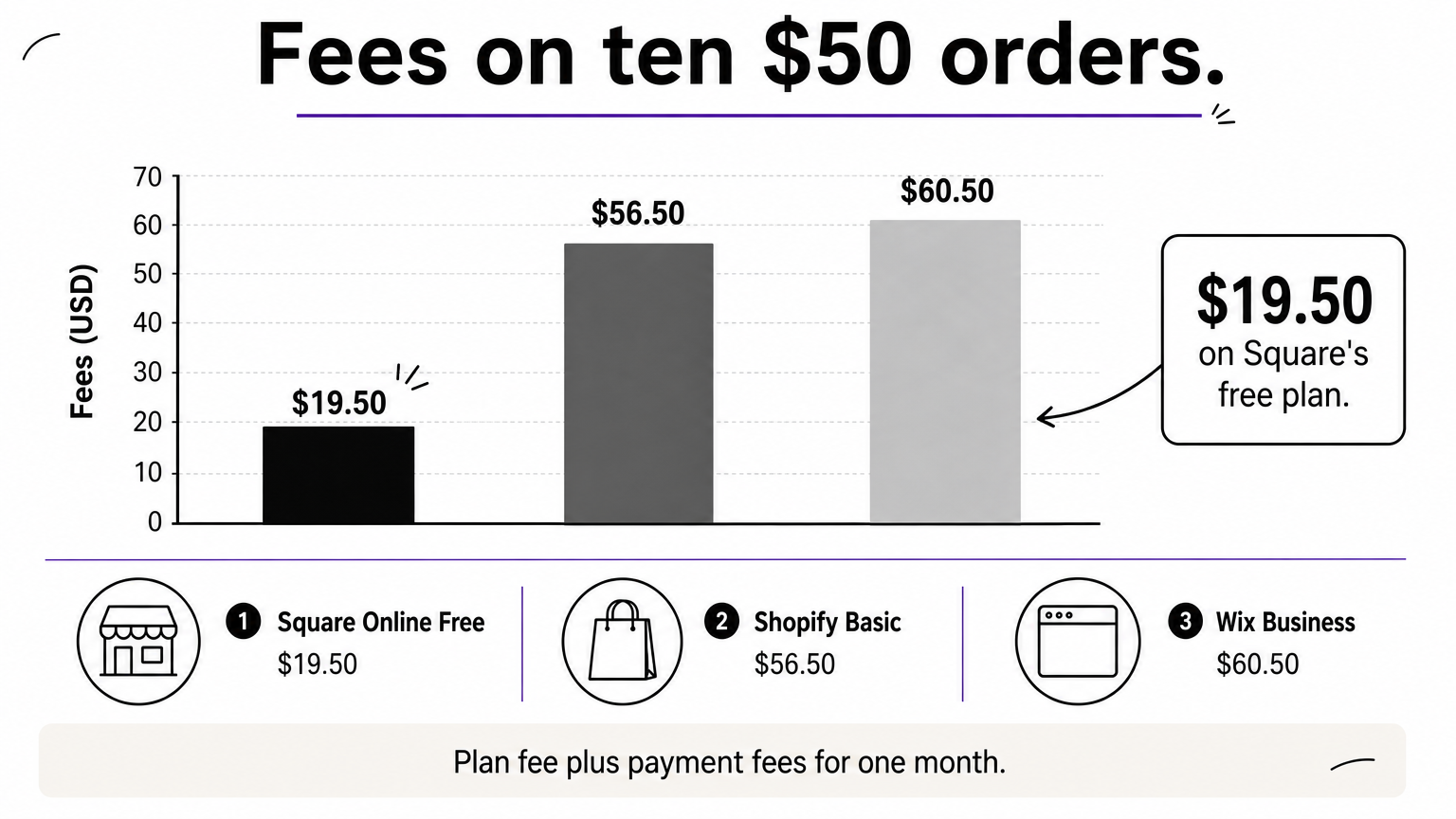
The gap shrinks as you sell more, because Shopify’s per-sale fee is $0.20 lower. On fees alone, Shopify only becomes cheaper than Square’s free plan after about 195 orders of $50. If you use an outside gateway with Shopify, an extra 2% transaction fee applies on top of the gateway’s own charge. Run this arithmetic with your own order size before you pick a platform.
What to check before you sign up
Run through this list on any pricing page. It takes five minutes and saves a migration later.
- Can you take payments on the free plan, or only publish pages?
- What are the item and order caps?
- Does the free plan show the platform’s branding or a platform subdomain?
- Does checkout support UPI and cash tracking, and can you issue GST invoices?
- Can you move to a paid plan without rebuilding your catalog?
A free plan is only free if you can take orders and payments on it.
1. Pi-Square: best for social media sellers
Pi-Square is the best pick if your customers find you on WhatsApp, Instagram, Facebook or other social platforms and you want that habit to grow into a proper store. You share one link in your bio, status or chats, customers need no app, and the free plan covers 10 items and 30 orders a month.
How it works
You download the Pi-Square app, or use the web app, and create a commerce link in minutes. The link can sell products, services, bookings, event tickets, digital items or donations. Customers open it in a browser to order, book or pay, and they can keep ordering on WhatsApp or place direct orders if you enable that flow.
Behind the link sits an operations layer that most free builders skip. It manages direct, WhatsApp and manual orders with fulfillment status, tracks cash and UPI payments by hand for free, and creates GST compliant invoices through simple settings. It also tracks inventory in real time, supports coupons and abandoned cart follow-up, and suggests add-ons during WhatsApp ordering through WhatsApp Upsells.
Free plan and pricing
The plans differ mainly in scale, team access and domain.
| Plan | Price | Items | Orders | Staff | Custom domain |
|---|---|---|---|---|---|
| Free | ₹0 | 10 | 30 a month | 1 | No |
| Pro | ₹300 a month (₹3,000 a year) | 100 | 300 a month | 3 | Yes |
| Growth | ₹1,000 a month (₹10,000 a year) | 10,000 | Unlimited | 10 | Yes |
Payment gateway fees are typically around 2% of order value, paid directly to the gateway, and shipping or COD charges come from the courier. WhatsApp Upsells carries a 10% charge on additional sales only. Say you take 30 orders at ₹500, which is ₹15,000. If every order is paid through a gateway at about 2%, you pay roughly ₹300 to the gateway. If upsells add ₹1,000 of extra sales, that adds ₹100. The subscription stays at ₹0.
Who it suits
Pi-Square suits social media sellers in general: Instagram and Facebook boutiques, WhatsApp and Telegram sellers, home bakers, grocers, gift and clothing sellers, event hosts, clinics and consultants, and anyone selling digital items or taking donations. It fits especially well if your orders are scattered across WhatsApp, Instagram DMs and other chats and you cannot tell who paid and what shipped. The demo sites for a bakery, event booking, local grocery and a service catalog show how each model looks.
Skip it if you will pass 30 orders a month or list more than 10 items and do not want to pay yet, since 300 orders and 100 items start on Pro, and unlimited orders start on Growth. The free plan also has no custom domain and only one staff account. Pi-Square is built around Indian selling (UPI, GST invoices, local shipping providers), so check gateway support if most of your buyers are abroad. GST settings help with calculation, but your actual obligations depend on your circumstances, so confirm them with a tax advisor.
Start on Pi-Square’s free plan if your sales already happen on WhatsApp, Instagram or other social platforms.
2. Freewebstore: best for a plain storefront at zero rent
Freewebstore is the simplest pick if you want a conventional web store with no monthly fee and no card on file. It is a general ecommerce builder rather than one shaped around WhatsApp or Indian payment habits.
How it works
You sign up, choose a design, add products and publish. The platform is hosted, so you do not manage servers. Its own site promises setup in about 10 minutes, free hosting and free SSL, which gives your store the padlock in the browser bar.
That covers the basics of a storefront. What it does not tell you at a glance is how checkout works for your country, so open its payment settings early and see which gateways it connects to. Payment support decides whether a free store becomes a working one.
Free plan and pricing
The advertised offer is simple:
- Free forever, with no trial period and no credit card at sign-up
- Unlimited products
- Free hosting and SSL certificate
Before you build, look for the usual catches: whether your own domain needs a paid plan, whether a platform logo stays on the store, and what fees apply to online payments. These details are not stated in the headline offer, so read the plan page rather than assuming.
Who it suits
It suits a first-time seller with a modest catalog who wants to test demand without spending anything. It is also a reasonable practice run if you have never built a store and want to learn the parts (products, categories, policies) before moving to a more specialized tool.
Think twice if you rely on UPI collection, GST invoices or WhatsApp order handling. Confirm that each one exists before you upload a single product. If one is missing, you will do that work by hand, and the builder’s free price will not make up for it.
Pick Freewebstore for a simple, no-cost storefront, then verify checkout before you invest time.
3. Instamojo: best for payments and shipping in one place
Instamojo is built for Indian sellers who want an online store that comes with payments already wired in. Its page describes a free ecommerce website with an in-built payment gateway and shipping across India.
How it works
You create the store, list products and start accepting payments through the built-in gateway, so you skip the step of applying to a separate payment provider. Shipping is part of the offer too, which means you can sell to customers in other cities without arranging couriers yourself.
This bundling is the real appeal. The slowest part of launching a store is often payment onboarding, and a builder that includes it removes a common stall. Treat the setup as two tasks anyway: build the catalog, then complete any identity or bank verification the payment side asks for.
Free plan and pricing
Creating the store is free. Money comes out of each online sale as a payment gateway charge, so the cost scales with your sales rather than with a plan. Check the current per-transaction rate on its pricing page, then run it against your average order value the way the ten-order example earlier did.
Shipping charges are separate from the store itself, as they are on every platform. Compare courier rates for your usual parcel weight and distance, because a cheap gateway fee can be erased by expensive shipping.
Who it suits
Instamojo suits sellers of physical products who ship across India and want one account for storefront, payments and delivery. A candle maker, a jewelry label or a packaged-food seller fits well. It also suits people who find gateway paperwork off-putting.
If your business runs on WhatsApp negotiation, appointments or event tickets, check that the features you need exist before you commit. A payments-first tool can lack order handling, upsells and booking flows. Ask whether you will still manage chats by hand.
Choose Instamojo when you want payments and India-wide shipping bundled with a free store.
4. Store.link: best for very small catalogs
Store.link suits a seller with a short product list who is comfortable in a spreadsheet. Its page describes a free store builder powered by Google Sheets, with AI setup, WhatsApp orders and several payment options.
How it works
Your catalog lives in a Google Sheet. You edit a row, and the store changes. AI helps with the first setup, so you do not start from a blank page. Customers browse and send their order over WhatsApp, which keeps the buying flow familiar to people who already message sellers.
A spreadsheet as your product database is both the charm and the limit. It is fast to update and easy to understand, and anyone who knows Sheets can run it. It also means you manage structure yourself, such as product names, prices and stock columns.
Free plan and pricing
The builder is offered free to create a store. Confirm which payment options are included on that tier and whether any branding or limits apply. As with every free builder, the payment fee on each sale is the real running cost, so ask which gateway you would use and what it charges.
Because the pricing details are not spelled out in the headline offer, read the plan page before sharing your link with customers.
Who it suits
It suits a home seller with perhaps a dozen to a few dozen items who sells mainly by chat. A weekend baker or a handmade-goods seller can launch in an afternoon and learn what customers ask for.
It is a weaker fit when the catalog grows, when products have many variants, or when several people handle orders. Spreadsheet catalogs get harder to keep accurate as stock changes, and there is no clear sign of staff roles or order tracking in its pitch. At that point, move to a tool with order management built in.
Use Store.link to test a small catalog quickly, and plan to outgrow it.
5. Square Online: best for selling in person and online
Square Online is a good free pick for sellers who also take card payments face to face. Its free plan allows unlimited products on a Square-branded site, with a custom domain and removal of branding only on paid plans.
How it works
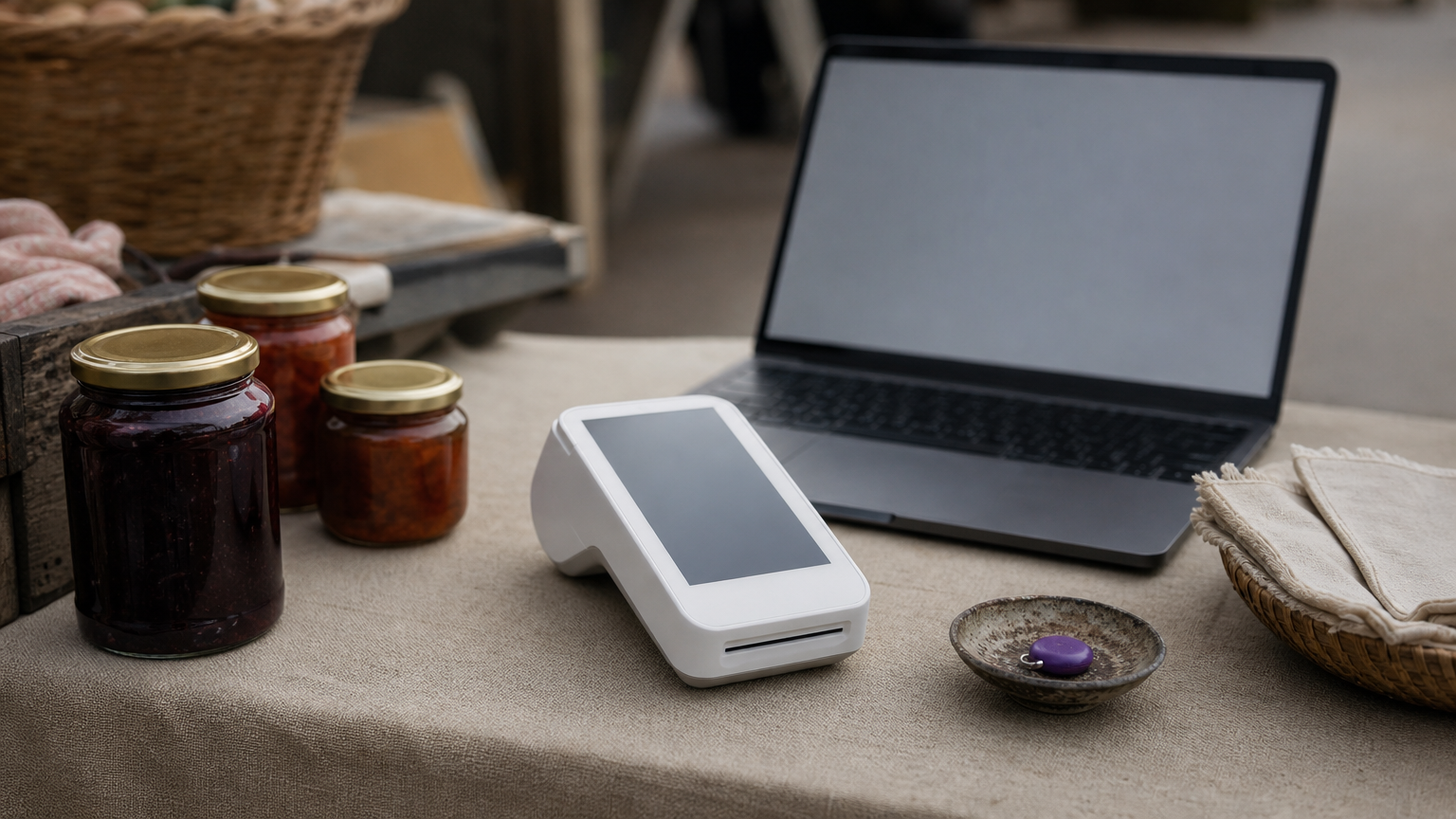
Square’s store builder runs on Weebly, which Square bought in 2018. You answer a questionnaire about your business, and the setup guides you through the rest. Your online store becomes another sales location next to your in-person sales, with inventory synced across both. If you sell your last item at a market stall, the online listing stops showing it.
Orders from both channels land in one dashboard, which avoids re-entering sales from a notebook. Customization is more limited than on some rivals: free users build their own design in the site builder, while paid users get customizable themes.
Free plan and pricing
| Plan | Price | Online card fee |
|---|---|---|
| Free | $0, Square-branded site | 3.3% + $0.30 |
| Paid | From $49 a month, billed annually | 2.9% + $0.30 |
The paid tier adds a custom domain, custom themes and removal of Square branding. In-person card reader sales cost 2.6% + $0.10 each. These are published rates in US dollars, so check the live pricing before you plan around them.
Who it suits
It suits sellers with a physical presence, such as a stall, a shop counter or a pop-up, who want one system for both channels. If you already use Square’s point-of-sale tools, adding the online store is a short step.
One check matters before anything else. Square’s payments service runs only in selected countries, so confirm it works for your business and bank account before you build. If it does not, the free plan has little value. Also expect no UPI-style local payment depth, and weigh that against builders made for Indian buyers.
Square Online works best when in-person sales matter as much as online ones, and only where Square payments are available to you.
6. WooCommerce: best if you already run WordPress
WooCommerce is the pick for sellers who already have a WordPress site and want full control over the store. The plugin is free, but a working store still needs hosting, a domain and often paid extensions.
How it works
You install WooCommerce as a plugin on a self-hosted WordPress site. Products are added much like blog posts, with a description, image, categories and tags, and orders, coupons and reports sit inside the same dashboard you already use. A large extensions marketplace adds shipping rates, payment gateways and subscriptions.
The trade-off is upkeep. You apply updates, watch plugin conflicts and keep the site secure. Gateway plugins for services popular in India, such as Razorpay and Paytm, and GST invoice plugins exist, but you assemble the setup yourself.
Free plan and pricing
The standard plugin is free on a self-hosted site, and transaction fees depend on the payment gateway you attach. If you want a managed version, WordPress.com sells hosted plans, including a Business plan at about $40 a month and a Commerce plan at about $70 a month. Treat these as indicative and check current pricing.
So “free” here means free software. Add hosting, a domain, paid extensions and your own time before you compare it with a builder that includes everything.
Who it suits
It suits people who know WordPress, bloggers who want a shop beside their content, and developers building stores for clients. If you enjoy tinkering, it gives you the most freedom for the least platform rent.
It is the wrong choice if you want to launch this weekend with no technical work. A non-technical owner can lose days to hosting, themes and plugins. If you do not already know WordPress, a hosted builder will get you to your first sale faster.
WooCommerce is free software, not a free store, so budget for hosting and maintenance.
7. Wix: best for design-led brands
Wix is best when how your store looks matters as much as how it sells. It is free to start building, but the plan that lets you sell products costs about $43 a month, so it belongs to the trial group.
How it works
Signup is handled by an AI chatbot that suggests pages and apps for an online store and fills your site with starter content. A drag-and-drop editor gives you control over layout, fonts and colors without code. Even the lowest eCommerce plans include order tracking and abandoned cart recovery.
A third-party app market lets you connect accounting and shipping tools. You can also build a full business website around the store, with an about page, a blog and a contact page, all in one place.
Free plan and pricing
Wix offers a 14-day free trial, then the Business plan starts from $43 a month. Wix Payments charges 2.9% + $0.30 per transaction, and other gateways have their own fees. You can build a site for free, but you cannot treat that as a free store, because selling needs the paid plan.
Using the earlier example, ten $50 orders would cost $43 plus $17.50 in payment fees, which is $60.50. That is the benchmark to beat if you want the design freedom.
Who it suits
It suits creative sellers, boutique brands and service businesses that want a distinctive site and a store as one part of it. If you care about a custom look and do not want a developer, Wix delivers.
It is not laser-focused on commerce, and too much design freedom can slow you down. It is also a poor match for a seller whose main channel is WhatsApp and who needs UPI tracking and order handling. In that case you would pay more for features you will not use.
Choose Wix when design is the point, and accept that you are paying for it.
8. Shopify: best when you are ready to pay and scale
Shopify is the safest paid choice for serious growth, not a free option. You get a short trial, then plans start from $39 a month, which makes it the right upgrade path rather than the right starting point for a zero-budget seller.
How it works
A chatbot walks you through adding products, choosing a look, connecting a domain and setting up payments. The admin is clearly labeled and the help docs are thorough. Shopify offers 24 free themes and more than a thousand paid ones, plus a large app store for anything it does not do natively, from shipping rules to upsells.
Its AI tools, which it calls Magic and Sidekick, help write product descriptions and generate sales reports. Local gateway integrations such as PayU, Razorpay and CCAvenue are available, and a point-of-sale option exists for physical shops.
Free plan and pricing
The trial runs three days, then $1 a month for three months, then plans from $39 a month on Basic with 2.9% + $0.30 per transaction. Using an outside gateway adds a 2% transaction fee. The ten-order example earlier came to $56.50, and apps can push that higher because each one adds its own monthly fee.
Shopify’s own gateway keeps fees lowest. If you must use another gateway, add the extra 2% to your math before you commit.
Who it suits
It suits sellers who already have steady sales, plan to grow fast and want the broadest app support and strongest documentation. If you are moving from a small free store because you have outgrown it, Shopify is a safe place to land.
If you are still testing whether people will buy, it is overkill. A beginner can feel overwhelmed by the options, and the monthly costs stack up before the store has paid for itself. Prove demand on a free plan first.
Treat Shopify as the plan you graduate to, not the place you start.
Free online store builders compared
Among these eight, Pi-Square, Square Online and Freewebstore offer permanent free plans, WooCommerce is free software with paid hosting, and Wix and Shopify are paid after a trial. Use the table to match the builder to your situation.
Side-by-side table
| Builder | Free route | Main catch | Best for |
|---|---|---|---|
| Pi-Square | Free plan: 10 items, 30 orders a month | No custom domain on Free; 100 items and 300 orders from Pro at ₹300 a month | Social media and WhatsApp sellers, bookings, events |
| Freewebstore | Free forever, unlimited products (as advertised) | Verify payments and extras for your country | First simple storefront |
| Instamojo | Free store with built-in gateway | Per-sale gateway charge; shipping billed separately | Sellers shipping across India |
| Store.link | Free, Google Sheets-based | Spreadsheet catalog suits small ranges | Tiny catalogs sold by chat |
| Square Online | Free, unlimited products, Square branding | 3.3% + $0.30 per sale; check country availability | In-person plus online sellers |
| WooCommerce | Free plugin | Hosting, domain, extensions, upkeep | WordPress users |
| Wix | 14-day free trial | From $43 a month to sell | Design-led brands |
| Shopify | 3-day trial, then $1 a month for 3 months | From $39 a month; apps add up | Fast-growing sellers |
How to pick by situation
Match your main selling channel first, then your budget, then your technical comfort.
- You sell mostly on WhatsApp, Instagram or other social media: Pi-Square.
- You want the simplest free storefront: Freewebstore or Instamojo.
- You have under 30 products and like spreadsheets: Store.link.
- You sell at a stall and online: Square Online, where available.
- You run WordPress: WooCommerce.
- You are design-first and can pay: Wix.
- You are scaling and can pay: Shopify.
Two more worth knowing
Two other platforms often come up in this search. Ecwid has dropped its free plan, and recent pricing starts at about $5 a month for 10 products, which suits adding a store to a site you already have. BigCommerce starts from about $39 a month and caps annual online sales by tier, which suits larger sellers more than beginners. Neither is a free route, so they sit outside the eight above.
How to build an online store for free in six steps
You can build an online store for free in an afternoon if you prepare the catalog first and test one order yourself before sharing the link. The steps below work on any free online store builder.
Prepare before you open the builder
Gather 10 to 20 products or services with clear photos, prices and short descriptions. Decide how you will take payment, whether through a gateway, UPI or cash on delivery, and how you will deliver. A builder is quick once this is ready and slow when you invent it midway.
The six steps
- List your first products. Write each name, price, variant and photo in a note or sheet.
- Pick a builder and sign up. Use the comparison table to choose by channel and budget.
- Add products with variants and add-ons. Keep names short and photos bright.
- Set up payments and delivery. Connect a gateway or track UPI and cash manually, then add your courier or delivery rules.
- Add policy pages and tax details. Include returns, shipping and contact pages. If you issue GST invoices, enter your details and confirm the rules with your tax advisor.
- Share the link and place a test order. Put it in your WhatsApp status, Instagram bio and Google Business Profile.
Details that bite later
Choose your link name carefully. On Pi-Square, if you change a link name, the old link stops working and someone else can claim it, so every printed card and shared post would break. Keep manual payment tracking on from day one so cash and UPI orders stay in the same record as online ones. Then watch which items sell and add the next 10.
Launch with a short catalog and a tested checkout, then improve it with real orders.
Pick one and place your first order
The right online store builder depends on where your customers already are. If they message you on WhatsApp or Instagram, a builder that tracks orders, payments and upsells beats a pretty template. If you want a plain storefront, Freewebstore or Instamojo cover it, and if you want design or scale, Wix and Shopify are worth their monthly fee once demand is proven.
Do not wait for the perfect platform. Pick from the table, load ten products and place a test order. If you sell on social media, create your free Pi-Square store and share your first link today.