Blog
Event Registration Platforms in India: 6 Best Options
Compare 6 event registration platforms in India by features, fees and fit, from free tools to enterprise suites, and pick one for your next event.
Published November 12, 2026
The best event registration platform is the one that matches your event size and the way you collect money. For workshops, classes, pop-ups and community events in India, Pi-Square gives you a shareable registration link, advance payments and GST invoices, and you can start at ₹0. Eventbrite suits public ticketed events that need discovery. Whova and Cvent suit conferences and trade shows. RegFox suits organizers who want low per-registration fees, and Wild Apricot suits clubs and associations.
Most organizers begin with a form and a WhatsApp group. That works until 80 people have signed up, half have paid by UPI, and nobody can say who is confirmed. You then spend the week matching payments to names instead of preparing the event.
This guide compares six online event registration tools by what they do, who they fit and what they cost. We build Pi-Square, so we list it first and also say where it falls short. Prices for the other tools are published list prices in US dollars, so confirm current rates and Indian payment support on each vendor’s site before you commit.
What to look for in event registration software
What an event registration system does
An event registration system collects sign-ups, payment and one attendee list in a single place. Everything beyond that, such as badges or sponsor booths, is an add-on that only some events need. Decide which jobs you need before you compare software for event registration on price.
- A registration form or page that attendees can open on a phone
- Ticket types, such as free, paid, early bird and VIP
- Online payment and a confirmation sent to the attendee
- An attendee list you can search, export or check against at the door
- Optional extras: badges, group tickets, discount codes and reminders
Pricing models you will run into
Pricing falls into four models, and the model matters more than the headline number. Per-ticket fees are cheap for small events and costly for large paid ones. A flat subscription works the other way round.
| Model | How you pay | Works best when |
|---|---|---|
| Per-ticket fee | A percentage plus a flat amount on each paid ticket | You run few events or sell low volumes |
| Per-registration fee | A fee based on attendee volume | Your volumes are predictable |
| Subscription | A monthly or annual plan, often with no ticket fee | You run events regularly |
| Enterprise contract | A custom quote that covers several modules | Your event is large and complex |
Checks that matter in India
Payment support comes first. Confirm the tool can take UPI and cards in rupees and pay out to an Indian bank account, because several well-known platforms price in US dollars. If you sell paid tickets as a business, ask about GST compliant invoices as well.

Attendee effort comes next. If people must install an app or create an account, fewer of them finish registering. A plain link that opens in a browser and travels easily on WhatsApp removes that friction.
Match the tool to your event size and payment method before you look at a single feature.
1. Pi-Square
What it does

Pi-Square lets you build a shareable commerce website from the mobile or web app in minutes. You can use it as an event registration website for tickets, registrations, stall bookings and advance payments. Online registration for an event then takes one link, and attendees install nothing.
- Variants and add-ons, which you can use for ticket tiers, meals or merchandise
- Payment gateway checkout, or manual payment tracking for cash, UPI and other modes
- Order management with status for direct, WhatsApp and manual orders
- GST compliant invoices and a daily sales dashboard
- Discount coupons with expiry dates, order limits and first-order controls
- Abandoned cart follow-up and role-based staff access
Who it suits
Small and mid-size organizers get the most from it: class hosts, pop-up and stall organizers, community groups and event businesses. It also works for sellers who already take bookings on WhatsApp and want orders, payments and follow-up in one workflow.
Be aware of the limits. Badge printing, an onsite check-in app and conference agenda tools are not part of what Pi-Square lists. A large multi-track conference is better served by Whova or Cvent.
Pricing
The Free plan costs ₹0 and the Pro plan costs ₹300 a month, or ₹3,000 a year. Growth is for larger catalogs and teams.
| Plan | Price | Orders | Items | Staff accounts | Custom domain |
|---|---|---|---|---|---|
| Free | ₹0 | 30 per month | 10 | 1 | No |
| Pro | ₹300 per month (₹3,000 per year) | 300 per month | 100 | 3 | Yes |
| Growth | ₹1,000 per month (₹10,000 per year) | Unlimited | 10,000 | 10 | Yes |
Take a workshop with 200 attendees at ₹500 each. Sales come to ₹1,00,000. A payment gateway fee of about 2% is ₹2,000, and it goes to the gateway, not to Pi-Square. Add one month of Pro at ₹300 and the total cost is about ₹2,300, or 2.3% of sales. The Free plan allows 30 orders a month, so a 200-person event on separate orders needs Pro, which allows 300. Manual payment tracking is free if you collect cash or UPI yourself.
A 200-person, ₹500 workshop costs about ₹2,300 to run on Pi-Square, gateway fee included.
2. Whova
What it does
Whova is a conference platform where registration connects directly to badges, check-in and the event app. You can run free or paid tickets, early bird and invite-only pricing, and a separate question form for each ticket type.
- Group tickets and discount codes
- Member verification and integrations with AMS and CRM tools such as HubSpot, MemberClicks and iMIS
- Booth selection for exhibitors and sponsorship packages inside registration
- Retargeting emails for abandoned registrations
Who it suits
Whova fits professional conferences, association events, trade shows and expos. At those events a member, a speaker, a sponsor and an exhibitor each need a different registration path.
Skip it for events under about 50 attendees, and for personal events such as weddings and parties. The platform is built for operations that are more complex than that.
Pricing
Pricing is custom per event. The listed fee is 3.0% + $0.99 per paid ticket, and free tickets carry no fee. On a $500 ticket that is $15.99. Whova also lists early payout, so ask whether it applies to Indian bank accounts.
Request a quote with your attendee count and the modules you need, since the final price depends on the whole setup and not on the ticket fee alone.
Whova pays off when registration, badges, check-in and the app must work as one system.
3. Eventbrite
What it does
Eventbrite is a ticketing marketplace as well as a registration tool. You build a customizable event page, add multiple ticket types and custom questions, and public event discovery can bring in people who have never heard of you.
- Ticket scanning and attendance monitoring at the door
- Ticket sales at the door
- A free-to-start account, according to Eventbrite’s own page
Who it suits
It suits public entertainment events, social gatherings, parties and casual classes where you want to reach strangers. Attendees often know the site already, which reduces hesitation at checkout.
Professional events that need advanced management features, such as multi-path forms, member verification or exhibitor booths, outgrow it quickly.
Pricing
Eventbrite is free to start, and the listed fee on paid tickets is 3.7% + $1.79. On a $500 ticket that is $20.29. The flat part of that fee weighs most on cheap tickets, so a low-priced workshop gives up a bigger share of each sale.
Check how fees and payouts work for events held in India, since the figures here are US list prices.
Eventbrite earns its fee when discovery brings you attendees you would not reach on your own.
4. Cvent
What it does
Cvent is an enterprise suite where registration links to hotel room requests and travel reservations. Pre-populated forms, built-in approval workflows and integrated payments sit alongside extensive analytics.
- Highly granular registration paths
- Approval steps before a registration is confirmed
- Integrated payment solutions
Who it suits
Cvent fits large, complex events: summits, big conferences and trade shows where approvals and travel need managing. It can handle almost any registration rule you throw at it.
Expect a steeper learning curve and a more complex setup than the other tools here. For a 150-person workshop, that is more than you need.
Pricing
Cvent sells on an enterprise contract, and its registration features require one. The price is not published, so you need a quote. Budget time for sales calls and onboarding as well as money.
Because there is no public price, compare it with the other tools using your attendee count and required modules, not a list price.
Cvent makes sense only when your event is complex enough to justify an enterprise contract.
5. RegFox
What it does
RegFox is built around payment flexibility. You can add optional convenience fees, accept installment payments, store a card on file for later purchases and place liability waivers inside the registration flow.
- Purchaser protection with a full refund
- A check-in app and an attendee event app for light event management
Who it suits
RegFox fits conferences, workshops, camps and classes where registration revenue and payment terms matter. A camp that takes deposits and waivers is a good example.
Integrations with CRM, AMS and marketing tools are limited, and analytics and reporting are thin. If your team lives in a CRM, test the connection before you commit.
Pricing
The standard plan starts at $0 a month and charges $0.99 + 1% per registrant. On a $500 ticket that is $5.99, lower than Whova’s or Eventbrite’s listed fee, before card processing charges.
An optional convenience fee lets you pass part of that cost to the attendee, so decide up front who pays.
RegFox gives you the cheapest listed per-ticket fee here, at the cost of weaker integrations and reporting.
6. Wild Apricot
What it does
Wild Apricot ties event registration to a membership database. It handles new member acceptance and membership renewals, and it builds an event website and calendar for you.
- Registration linked to member records
- Member acceptance and renewals in the same system
- Event website and calendar creation
Who it suits
It suits nonprofits, associations and clubs that manage members and events in one place. A club running monthly meetups and yearly renewals gets the most from it.
Wild Apricot is optimized for membership organizations, so it can feel limiting for standalone conferences or public ticketed events.
Pricing
Plans start at $66 a month for 100 contacts, or $59.40 a month when you prepay for the year, which is $712.80 annually. Pricing follows your contact count and the listed plan has no per-ticket fee.
Costs rise as your member list grows, so price the plan against the size you expect next year, not today’s.
Wild Apricot is worth it when members, renewals and events belong in one system.
Event registration platforms compared at a glance
Side-by-side comparison
| Platform | Best for | Pricing model | Listed price |
|---|---|---|---|
| Pi-Square | Small events, classes, pop-ups, stalls | Free start, then subscription | ₹0 Free, ₹300 per month Pro, gateway fee about 2% |
| Whova | Conferences, trade shows, associations | Custom per event | 3.0% + $0.99 per paid ticket |
| Eventbrite | Public ticketed events | Per-ticket fee | 3.7% + $1.79 per paid ticket |
| Cvent | Large enterprise events | Enterprise contract | Not published |
| RegFox | Workshops, camps, classes | Per-registration fee | $0.99 + 1% per registrant |
| Wild Apricot | Clubs, nonprofits, associations | Subscription by contacts | From $66 per month for 100 contacts |
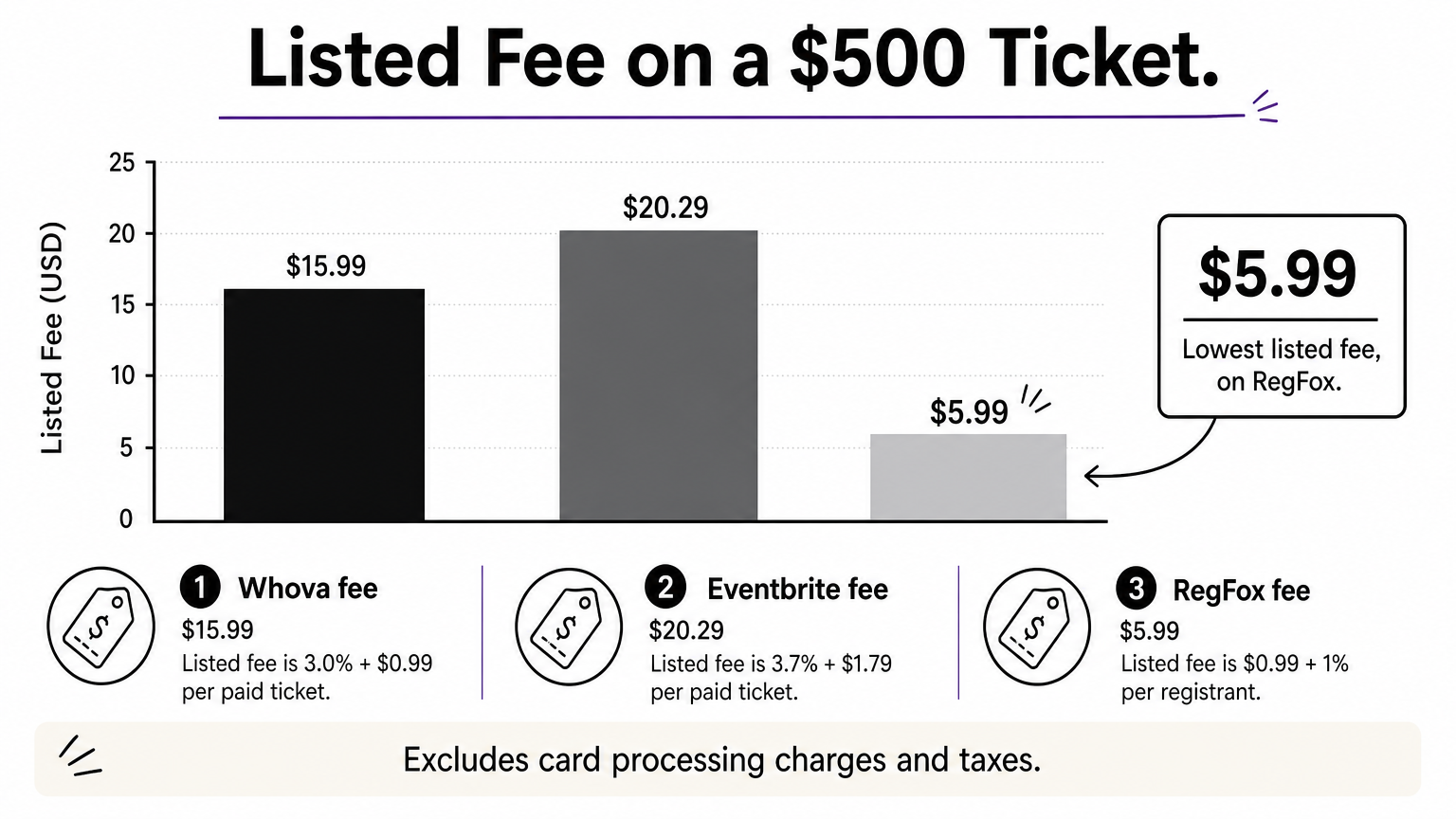
On a single $500 ticket, the listed fees are $15.99 on Whova, $20.29 on Eventbrite and $5.99 on RegFox. On Pi-Square, a ₹500 ticket carries a gateway fee of about ₹10, plus your flat monthly plan. These figures exclude card processing charges and taxes, and the dollar figures are US list prices.
Which one fits your event
Pick by event type first and price second. Each tool above is strong in one situation and weak in the others.
- Fewer than 30 registrations a month, rupee payments, quick setup: Pi-Square Free
- A larger event with up to 300 or more orders a month and a custom domain: Pi-Square Pro or Growth
- A public ticketed event that needs discovery: Eventbrite
- A multi-track conference with badges and check-in: Whova
- An enterprise event with hotels, travel and approvals: Cvent
- Workshops or camps with installments and waivers: RegFox
- A club with membership renewals: Wild Apricot
Shortlist two tools and run a test registration yourself on a phone, paying with the method most of your attendees will use. Ten minutes of testing shows you more than any feature list.
Choose by event type first, then let the pricing model break the tie.
Choose by event size, then test it
An event registration tool should collect sign-ups, take payment and give you one reliable attendee list. For small and mid-size events in India, a simple tool with rupee payments and GST invoices is usually enough. Conferences and trade shows justify heavier platforms with badges, check-in and integrations. Check the pricing model against your ticket price, because a flat fee hurts cheap tickets and a flat plan favors busy organizers.
If your next event is a workshop, class, pop-up or stall, you can create your event registration link on Pi-Square and test the full flow before you share it with a single attendee.