Blog
Order Management System Software: What It Is, What It Does
Order management system software tracks every order from payment to delivery. Learn its core functions and how it differs from ERP and inventory tools.
Published November 11, 2026
Order management system software (OMS) is a tool that records every customer order and carries it through payment, stock checks, fulfillment, delivery and returns. It works across all your sales channels, so an order from WhatsApp, your website, a phone call or a shop counter lands in one list with one status. Think of it as the control room for everything between “I want this” and “it arrived.”
The idea is simple, but the boundaries confuse people. Sellers mix an OMS up with inventory tools, ERPs, CRMs and online store builders, and each of those does a different job. Some searchers even land here looking for “system software,” which means operating systems and drivers and has nothing to do with selling.
This article covers why an OMS matters, how it handles one order from start to finish, how it differs from neighboring software, and what to check before you choose one. At Pi-Square we build commerce tools for small Indian sellers who run orders out of WhatsApp chats, so the examples come from that world.
Why order management system software matters
Order management system software matters because once orders arrive from more than one place, memory and chat history stop working as a system. Missed orders, double-sold stock and unpaid balances cost you money and repeat customers.
What goes wrong without one
Say you sell cakes and take 40 orders a week across WhatsApp and Instagram. Each order needs a confirmation, a payment note, a stock check and a delivery update. At five minutes of back-and-forth per order, that is over three hours a week of admin before you bake anything.
Then the errors start. You promise 12 cakes for Saturday when you can make 10. A customer says they paid an advance and you cannot find the message. A repeat buyer’s last order is buried 300 messages up. None of this is a people problem. It is a missing system problem.
What you gain once orders live in one place
A working OMS gives you these basics:
- One order list for every channel
- Stock that drops when an order is confirmed
- A payment status on each order: paid, part-paid or pending
- Order statuses your team can read without asking you
- A purchase history for each customer
Small sellers feel this first as calm and later as growth. Once you know who ordered what and when, you can follow up on abandoned carts, suggest add-ons and reward repeat buyers without digging through chats.
An order management system replaces guesswork about orders with one record you can trust.
How order management software handles an order
Order management software moves each order through a fixed sequence: capture, payment, stock, fulfillment, shipping, invoicing and after-sale. Each step is one of its core functions, and together they are what separates an OMS from a simple order list.
The core functions
| Function | What the software does | Small-seller example |
|---|---|---|
| Order capture | Collects orders from your site, WhatsApp, phone and in person into one list | You key in a WhatsApp order by hand |
| Payment tracking | Records paid, part-paid and pending, by gateway, UPI or cash | An advance is logged against a custom order |
| Inventory sync | Reduces stock on confirmation and blocks sold-out items | A product flips to unavailable at zero |
| Fulfillment workflow | Moves orders through new, confirmed, packed, shipped, delivered | Your packer sees what to pack today |
| Shipping and tracking | Creates shipments with a courier and shares delivery updates | The customer gets a tracking update |
| Invoicing | Generates bills and tax invoices | A GST invoice is ready at dispatch |
| Returns and refunds | Logs the return, restocks the item, records the refund | A wrong-size shirt comes back to stock |
| Reporting | Shows daily sales, best sellers and repeat buyers | You see which items sell out first |
One order, start to finish
A customer messages you for two chocolate cakes at ₹800 each, so the order is ₹1,600. You enter it, and the status reads “awaiting payment.” The customer pays a 50% advance by UPI, so the system records ₹800 paid and ₹800 due on delivery, and stock drops by two cakes.
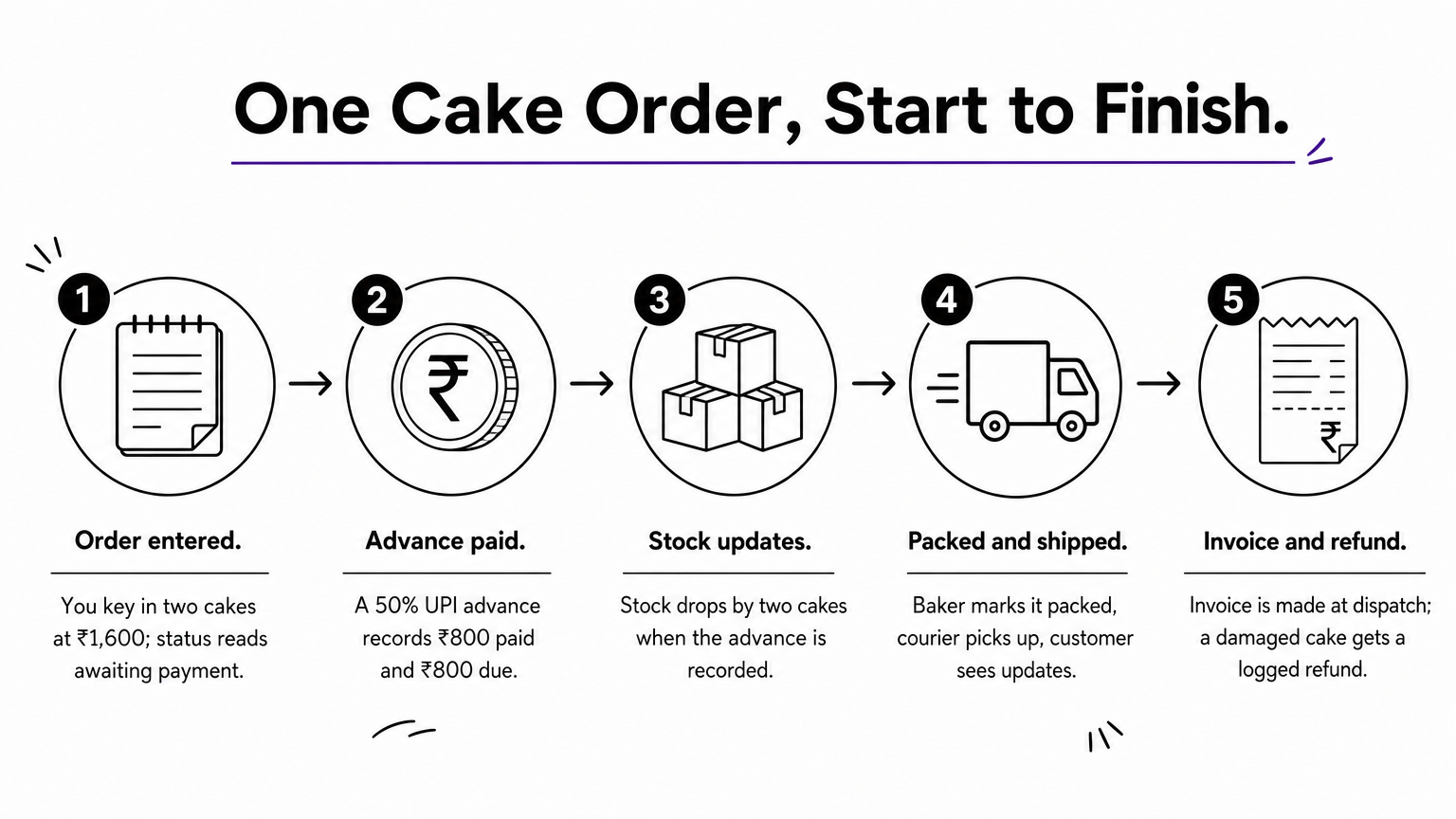
Your baker marks the order packed, the courier picks it up, and the customer sees the delivery update. At dispatch the system produces the invoice. If one cake arrives damaged, you log a refund and the order history keeps the full trail, so nothing depends on anyone’s memory.
Every order should have exactly one record that shows what was ordered, what was paid and where it is now.
How order management software differs from other software
Order management system software differs from other business software by its focus: it manages what happens to an order after the customer commits. ERPs, inventory tools, CRMs and store builders each cover a neighboring slice and overlap with it at the edges.
Order management versus neighboring tools
| Software | Main job | How it differs from an OMS |
|---|---|---|
| ERP | Runs finance, HR, purchasing and manufacturing in one suite | Far wider scope. Order management is often just one module |
| Inventory management | Tracks stock levels, reorders and locations | Knows what you have, not who ordered it or whether they paid |
| Warehouse management (WMS) | Directs picking, packing and bin locations on the warehouse floor | Handles physical movement. The OMS decides what must ship |
| CRM | Manages leads, conversations and relationships | Tracks people, not payments and fulfillment status |
| Online store platform | Shows products and takes checkout | Is the front door. The OMS manages everything after checkout |
| Accounting software | Keeps books, tax and financial reports | Records money after the fact. The OMS runs the order itself |
Operating systems, drivers and utilities are a different category altogether. System software runs the computer, while an OMS is application software that runs your orders.
When an OMS is enough and when you need more
For most small sellers, an OMS with built-in stock tracking and invoicing is enough. You do not need a full ERP to sell cakes, clothes, classes or consultations. A heavy suite adds setup time and cost without solving a problem you actually have.
Look at the core job rather than the label, because many products bundle several functions. Consider an ERP when you manufacture goods, buy raw materials or run several warehouses. Until then, a lighter tool that gets the order flow right is the better fit.
Choose software by the job you need done, not by the category name on the box.
How to choose order management system software
To choose order management system software, test it against how you actually sell today. Start with your real channels and payment habits, then check that the tool can grow with your volume.
Features to check
Use this checklist when you compare tools:
- Channels: Can you enter WhatsApp, phone and walk-in orders manually, not just website orders?
- Payments: Does it track UPI, cash, advances and part payments?
- Inventory: Does stock update in real time, and can you mark an item unavailable in one tap?
- Shipping: Does it connect to couriers and show tracking?
- Invoicing: Does it produce GST-compliant invoices?
- Team access: Can staff handle orders without seeing everything?
- Scale: Are there order caps, catalog limits or a custom-domain option?
Costs to check before you commit
Ask what is free, what is paid and what is billed by someone else. Payment gateways charge their own fees and courier companies charge for shipping and COD, so those sit outside the software subscription. Check whether the plan caps monthly orders, because a cap punishes you for growing.
Pi-Square is one example built for this kind of seller. It manages direct, WhatsApp and manual orders with fulfillment status, tracks payments across cash, UPI and other modes, connects supported shipping providers and tracks inventory in real time. You can start free and upgrade later. For GST invoices, it supports the settings, but your own obligations depend on your business, so confirm them with your tax advisor.
The right tool fits the way you take orders today and still works when volume triples.
Pick the system that fits your orders
Order management system software gives every order one record from the first message to the final delivery. It covers capture, payment, stock, fulfillment, shipping, invoices and returns, and it stays narrower and simpler than an ERP, a warehouse system or a CRM. If you handle orders in chat threads, the gap shows up as lost payments and oversold stock.
Start with the checklist above and judge each tool on your real orders. If you sell on WhatsApp, through a link or in person, you can set up your own commerce link on Pi-Square and see how an order flows through one place before you commit.