
Blog
6 Free Event Registration Form Templates to Copy and Use
Copy six free event registration form templates for RSVPs, paid tickets, workshops, webinars, conferences and stalls, plus the fields to ask in each.
Published November 13, 2026
The best event registration form asks for the few details you need to confirm a seat: full name, email, a WhatsApp number, the ticket or session choice, and consent. Add one or two fields that fit your event type and stop there. A short RSVP form suits free meetups, a ticketed form suits paid shows, and workshops, webinars, conferences and stall bookings each need a handful of their own questions.
Most organizers lose sign-ups in two ways. The form asks too much, so people quit halfway. Or there is no form at all, and names, payments and dietary needs end up scattered across chat threads that nobody can sort a week before the event.
This article gives you six copy-ready templates. Each one lists the fields to ask and a sample you can paste into Google Docs, Word or any form builder. A short guide then shows how to turn any template into a shareable registration link with Pi-Square, which lets organizers in India collect registrations and advance payments while guests only open a link. Its custom fields go one step further than a plain form, because the answers can change the price at checkout.
What every event registration form needs
Every event registration form needs five core fields: full name, email, phone number, the ticket or session choice, and a consent checkbox. Paid events add a payment step. Everything else is optional, and each optional field should earn its place by changing something you actually do.
The core fields
These fields work for any event, so each template below builds on them. Keep them in this order, because people expect to give their identity first and their choices second.
| Field | Why you need it |
|---|---|
| Full name | Check-in lists, badges, certificates |
| Confirmation, receipt, joining details | |
| Mobile or WhatsApp number | Reminders and last-minute venue or time changes |
| Ticket or session choice | Headcount per option, capacity control |
| Consent checkbox | Permission to contact and use details |
| Payment (paid events only) | UPI, card or advance amount |
Optional fields worth adding
Ask an optional question only when you will act on the answer. Every extra field costs you completions, so a question you never use is a tax on your own sign-ups.
If you will not use the answer, do not ask the question.
Good optional fields include:
- Dietary preference, if you serve food.
- Accessibility needs, such as wheelchair access or seating.
- Organization and designation, for networking events.
- How they heard about the event, to see which promotion worked.
Layout, consent and accessibility
For event registration form design, use a single column with labels above each field, large tap targets and a visible submit button. Most guests will open it on a phone, so test it there before you share it. Use readable font sizes and strong contrast so everyone can fill it in.
Tell people why you collect their details and who sees them. India’s Digital Personal Data Protection Act, 2023 puts notice and consent duties on those who handle personal data, so ask an adviser if you collect anything sensitive.
1. Free event RSVP form
Use this form for meetups, open houses, community gatherings and launch parties where entry is free and you only need a headcount. It is the shortest template in this list, and the shortness is the point.
What to ask and why
Beyond the core fields, an RSVP needs one extra question: how many people are coming. Free events tend to have more no-shows, so a guest count and a seat limit protect your catering and seating plans. Send a WhatsApp reminder the day before to bring attendance closer to your sign-ups.
- Number of guests: sets seating, catering and entry passes.
- Seat limit: closes the form when the room is full.
- Source question: tells you whether Instagram, WhatsApp or word of mouth filled seats.
A free RSVP form is a headcount tool, so keep it to five fields.
Copy-ready sample
Paste this into any document or form builder and replace the brackets. It also works as a free event registration form template in Word if you print it for a front desk.
[Event name] RSVP
Date and time: [date, time, venue]

Full name: ______
Email: ______
WhatsApp number: ______
Number of guests (including you): ______
How did you hear about this event? ______

[ ] I agree to receive updates about this event
    and to the use of my details for registration.
2. Paid ticketed event registration form
Choose this form for concerts, shows, fests and any event where guests pay before entry. It must show price, ticket type and refund terms clearly, because unclear money details are the quickest way to lose a buyer.
What to ask and why
The core fields stay, and you add a ticket choice, a quantity and a payment step. Show the ticket price, taxes and fees before the guest submits, so there are no surprises at checkout. Ask for the name of each ticket holder only if entry is checked by name.
Gateway charges are typically around 2% of order value and go to the gateway provider. Take 200 tickets at ₹500. That is ₹1,00,000 in sales and about ₹2,000 in gateway fees, so decide early whether to absorb that or build it into the price. If company buyers want invoices, add an optional GSTIN field.
- Ticket type and quantity: General, VIP, early bird.
- Payment mode: UPI, card or other options you accept.
- Refund policy checkbox: shows you set expectations.
On a paid event, the price and refund terms belong above the submit button.
Copy-ready sample
[Event name] Tickets
Date and time: [date, time, venue]

Ticket type:
[ ] General, Rs. ___   [ ] VIP, Rs. ___   [ ] Early bird, Rs. ___
Quantity: ______

Full name: ______
Email: ______
WhatsApp number: ______
Name of each ticket holder: ______
GSTIN (optional, for company invoice): ______

Payment mode: [ ] UPI  [ ] Card  [ ] Other
[ ] I have read the refund policy and agree to the terms.
3. Workshop or class registration form
This form fits workshops, classes, coaching batches and training days, where you need to place each person in a batch and know their level. It is the template that makes an event registration form work like a booking.

What to ask and why
The batch or date is the key field here, since many workshops run more than one session. Add a skill level question so you can group learners, and ask what they should bring. For children’s classes, collect a parent’s name and an emergency contact. If you want to hold seats, collect an advance payment instead of the full fee.
- Batch or date: caps each session at its own seat limit.
- Experience level: beginner, intermediate or advanced.
- Parent and emergency contact: only for classes with minors.
- Advance amount: confirms the seat and reduces no-shows.
In a workshop form, the batch choice does most of the work.
Copy-ready sample
[Workshop name] Registration
Venue: [address]

Preferred batch: [ ] [date, time]  [ ] [date, time]
Experience level: [ ] Beginner  [ ] Intermediate  [ ] Advanced

Full name: ______
Email: ______
WhatsApp number: ______
Age (if under 18): ______
Parent or guardian name and phone: ______
Anything we should know (allergies, injuries): ______

Advance payment: Rs. ___ to confirm your seat
[ ] I agree to the terms and the cancellation policy.
4. Webinar registration form
Pick this form for online talks, live demos and virtual workshops. The guest’s goal is simple: get the joining link. Your goal is to know who is coming and what they want answered.
What to ask and why
The core fields are enough, and the main addition is a question box for the speaker. People who submit a question usually show up, and you walk into the session knowing what to cover. Ask for a time zone only if you expect guests outside India, otherwise state the time in IST on the form.
If you will record the session, add a consent checkbox for it. Send the joining link by email and WhatsApp right after sign-up, then again an hour before the start.
- Question for the speaker: shapes the agenda.
- Recording consent: needed if you share the replay.
- Time zone: only for a mixed audience.
A webinar form should answer one thing fast: where is my link?
Copy-ready sample
[Webinar title]
Date and time: [date, time IST]
Platform: [Zoom, Google Meet or other]. Link sent after registration.

Full name: ______
Email: ______
WhatsApp number: ______
Organization (optional): ______
What would you like us to cover? ______

[ ] I consent to this session being recorded.
[ ] I agree to receive the joining link and reminders.
5. Conference registration form
Use this form for conferences, seminars and summits with several tracks, sponsors and badges. It asks the most questions of the six templates, so structure and clear grouping matter more than anywhere else.
What to ask and why
A conference needs professional details: organization, designation and the track or sessions they plan to attend. These help you plan rooms, build badges and match people for networking. Group the form into three parts, personal details, session choices and logistics, so it feels short even when it has twelve fields.
Add meal preference and accessibility needs here, since you serve food and host large groups. For company delegates, collect a billing name and GSTIN so your invoice is right the first time.
- Name for badge: the name printed, which can differ from legal name.
- Track or sessions: sets room sizes.
- Meal preference and accessibility: prevents day-of friction.
- Billing name and GSTIN: for company invoices.
Group a long conference form into short parts so it never feels long.
Copy-ready sample
[Conference name] Delegate Registration
Dates: [dates]   Venue: [venue]

PART 1: ABOUT YOU
Full name: ______   Name on badge: ______
Email: ______   WhatsApp number: ______
Organization: ______   Designation: ______

PART 2: SESSIONS
Track: [ ] [Track A]  [ ] [Track B]  [ ] [Track C]
Ticket: [ ] Delegate  [ ] Student  [ ] Group (3+)

PART 3: LOGISTICS
Meal preference: [ ] Veg  [ ] Non-veg  [ ] Jain  [ ] Other
Accessibility needs: ______
Billing name and GSTIN (optional): ______

[ ] I agree to the terms and to receive event updates.
6. Stall or exhibitor booking form
This form suits pop-ups, exhibitions, flea markets and festival stalls, where the registrant is a business, not a guest. You collect space needs, product details and a booking amount, so it reads more like an order than an RSVP.

What to ask and why
Sellers want to know what space they get and what it costs, so show stall sizes and prices on the form itself. Ask what they sell, so you avoid ten identical stalls, and whether they need power. Collect an advance to hold each stall, and state the balance due date.
For food stalls, ask for an FSSAI licence or registration number. If your venue has product rules, add a line about them above the submit button.
- Stall size and price: lets sellers self-select.
- Product category: helps you balance the mix.
- Power and table needs: avoids on-site scrambling.
- Advance amount: holds the stall until the balance is paid.
A stall form is really an order form, so list sizes and prices upfront.
Copy-ready sample
[Event name] Stall Booking
Dates: [dates]   Venue: [venue]

Business name: ______
Contact person: ______
Email: ______   WhatsApp number: ______
What will you sell? ______
FSSAI number (food stalls only): ______

Stall size: [ ] 6x6 ft, Rs. ___  [ ] 10x10 ft, Rs. ___
Need power: [ ] Yes  [ ] No
Need table and chairs: [ ] Yes  [ ] No

Advance to confirm: Rs. ___. Balance due by [date].
[ ] I agree to the stall rules and cancellation terms.
How to create a registration link for an event
To create a registration link for an event, pick the template that matches your event, then build it as a bookable page in a tool that gives you a shareable URL. With Pi-Square, you do this in the mobile or web app, and guests only open the link, with no app to install.
Build the link in minutes
Pi-Square serves organizers who sell tickets, collect registrations, book stalls and take advance payments, and it needs no technical knowledge. Start free and upgrade only when you need more scale.
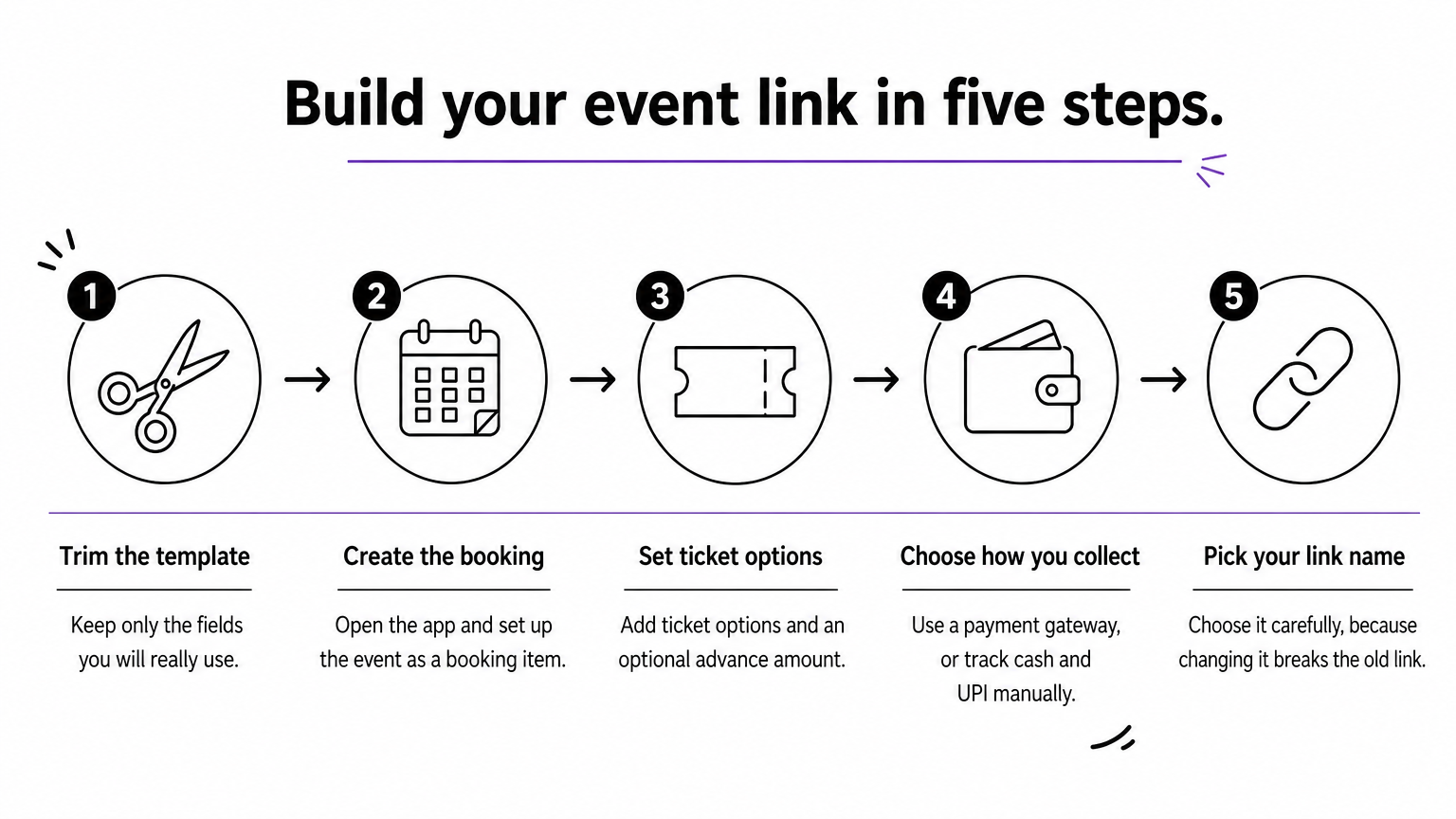
- Trim your chosen template to the fields you will really use. All fields can become custom fields.
- Open the Pi-Square app and create your link, then set up the event as a booking item with its details and price.
- Set your ticket options and an advance amount if you want one.
- Choose how you collect money: a payment gateway, or UPI scan with manual payment tracking for cash and UPI, which is free.
- Pick your link name carefully. If you change it later, the old link stops working and someone else can claim it.
Use custom fields to combine your form with checkout
A plain form collects answers. Pi-Square’s custom fields combine the form with the commerce flow, so an answer can also change what the guest pays. You set them up once on the item, and they appear at checkout.
There are two levels:
- Item fields apply to one ticket, class or stall. You can add up to 10 per item.
- Order fields apply to the whole booking, such as a gift message or an add-on charged once. You can add up to 10 per site.
The field types map neatly onto the templates above:
- Text with priced choices: offer a T-shirt size, a meal option or a VIP lounge add-on, each with its own extra price. A price of zero means no extra charge.
- Whole Number with a unit price: ask for additional guests or extra passes. At ₹300 per unit, entering 3 adds ₹900 to the order.
- Date: collect an arrival date within a window, such as from 2 days ahead to 30 days ahead.
- Appointment (items only): let guests pick a slot for a workshop, class or consultation, with notice periods, availability windows and blocked dates.
This replaces the dietary, batch and add-on questions in the samples with fields that confirm the price and the choice in one step. Read the full custom fields documentation for the setup options of each type.
Share the link where guests already are
Post the link in WhatsApp groups, Instagram bios and stories, and your event posters. Because customers can order, book, pay or message through a single link, one URL can replace a long chat thread. Print the link on posters only after you finalize the name.
Offline, Word and PDF versions
If you need an event registration form PDF for a desk or a notice board, paste any sample above into Word or Google Docs, format it, then print it or use the save as PDF option. Treat paper as a backup. Online sign-ups are easier to count, sort and follow up, so move late registrants onto your link.
Paper forms collect names, but a link collects names, payments and follow-ups together.
Pick one template and publish it
A good event registration form is short, clear and built around what you do with each answer. Start from the five core fields, add only the extras your event type needs, and show prices and terms before the guest submits. Whether it is a free RSVP, a paid ticket, a workshop, a webinar, a conference or a stall booking, the same rule holds.
Choose the template closest to your event, trim it, and test it on your own phone. Then turn it into a link people can open in seconds. If you want to do that without a developer, you can create your event registration link with Pi-Square and start free.