Blog
AI Invoice Maker: 5 Free-to-Start Tools for Freelancers
Compare five free-to-start AI invoice maker tools for freelancers and small businesses: what each does, who it suits, and what it costs.
Published November 15, 2026
The best AI invoice maker depends on how you bill. Portant is quickest if you want a PDF or Word file with no signup. QuickBooks suits you if you want your logo, brand colors and an editable file. Manus handles tax and currency through plain-language chat. Invoicer.ai fits repeat clients and recurring billing. Pi-Square suits Indian sellers who bill from orders and need GST invoices. A good pick is free to start, lets you edit every line, downloads a clean PDF, and gets the tax math right.
Most freelancers and small sellers still build invoices in a spreadsheet or word processor. They retype client details every month and fix totals by hand. Any invoice maker AI tool promises to cut that job to a minute. It can, provided you check what it produces before it reaches your client.
Below are five options. Four write the invoice from a description, and one generates it from your orders. We build Pi-Square for small businesses selling on WhatsApp and online, so invoices and GST are part of our daily work. We list it first and say plainly where it differs from the others. Each pick covers what it does, who it suits, and what it costs.
1. Pi-Square: GST invoices from your orders
Pi-Square does not write an invoice from a typed prompt. It creates GST compliant invoices from the orders you already take, and you can start free. For an AI invoice maker search, that makes it the right fit only when your invoices come from sales rather than one-off jobs.

What it does
You take an order through your Pi-Square link, on WhatsApp, or by entering it manually. The bill comes from that order, so you never retype items or prices. GST settings exist at the business level and the item level, so tax follows your catalog.
- Handles direct, WhatsApp and manual orders in one place
- GST settings for items, delivery charges and custom charges
- Manual payment tracking for cash, UPI and other modes, free of cost
- Daily sales dashboard, and customers need only a link, not an app
If your invoices come from orders, build them from the orders, not from a prompt.
Who it suits and what it costs
Pi-Square suits home businesses, local retailers, event hosts and service providers in India who sell over WhatsApp. It is a poor fit if you bill a few consulting projects a year and just want a document. The Free plan costs ₹0 a month and includes 10 items, 30 orders a month and 1 staff account, with no custom domain. If you outgrow it, the Pro plan costs ₹300 a month (₹3,000 a year) and includes 100 items, 300 orders a month, 3 staff accounts and a custom domain. GST compliance, order management and payment tracking come with both plans.
Pi-Square supports GST configuration and calculation. Your actual obligations depend on your own circumstances, so confirm them with your tax advisor.
2. QuickBooks free invoice generator
QuickBooks’ free AI invoice generator is the best pick when you want a branded invoice in a format you can keep editing. It is made by Intuit, the company behind QuickBooks Online.
What it does
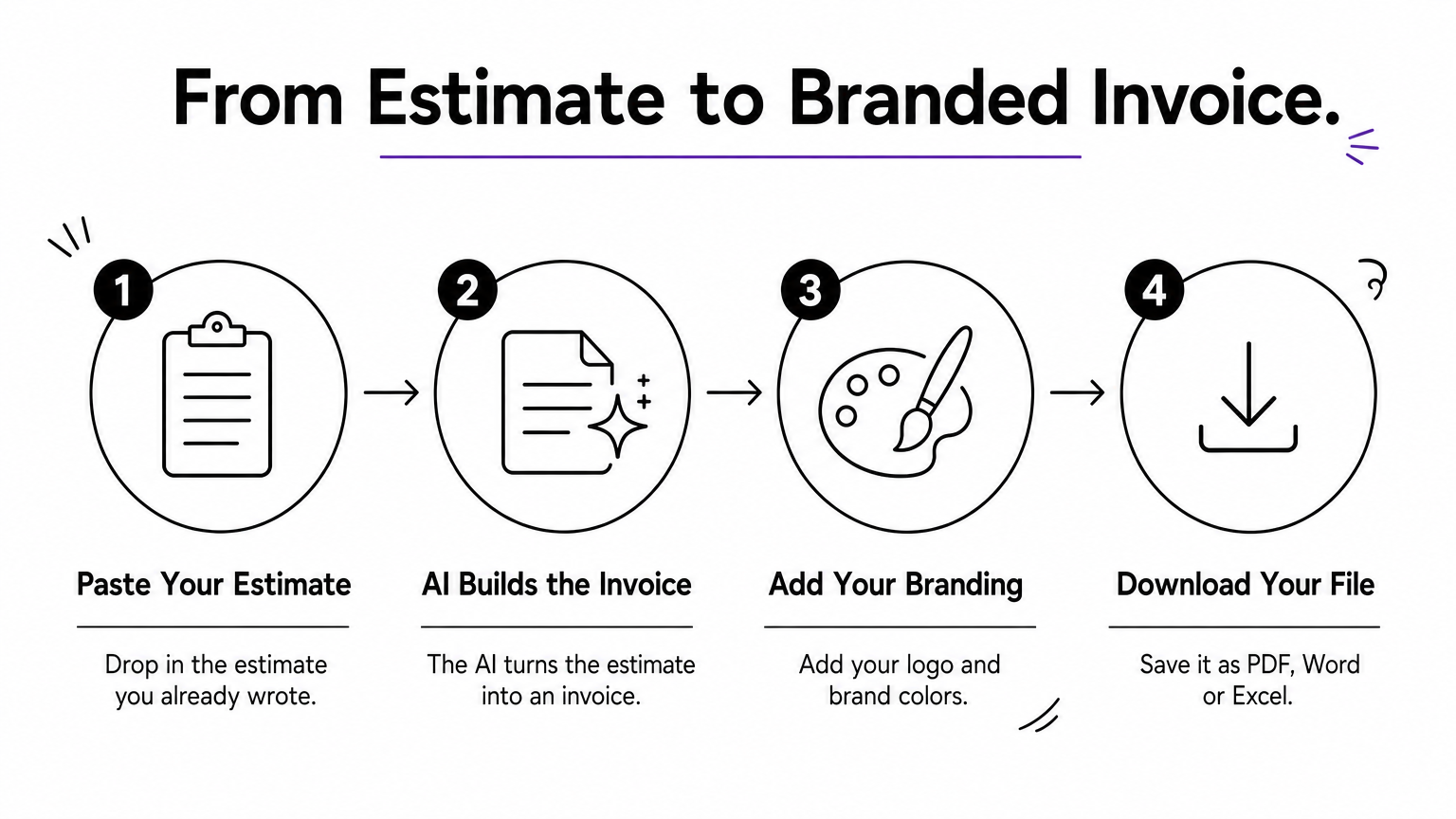
You paste in an estimate, and the AI turns it into an invoice. You then add your logo and brand colors. You can download the result as a PDF, Word or Excel file, which matters when a client’s finance team wants to edit or import it.
- Estimate-to-invoice conversion
- Logo and brand color customization
- Three download formats
Choose QuickBooks when the invoice has to look like your brand and open in the client’s software.
Who it suits and what it costs
This one suits freelancers and small agencies that already write estimates and want them converted without retyping. Generating the invoice is free. QuickBooks Online is a paid product, so you pay only if you later move your bookkeeping there. As with every AI invoice maker, read the totals before you send.
3. Portant AI invoice generator
Portant is the fastest route from a job to a document. You describe the work in plain language, and it returns a ready-to-send invoice as a Word .docx or PDF. There is no signup.
What it does
Type something like “Logo design for a bakery, 3 revisions, 15,000 rupees, due in 15 days”. Portant structures the invoice around that description. Because the Word file stays editable, you can fix a line item or add a bank detail in seconds.
- Plain-language input
- Word and PDF output
- No account needed
For a one-off invoice, no signup is the feature that matters most.
Who it suits and what it costs
Portant suits freelancers who invoice occasionally and don’t want another login. It is free to use. Treat it as a tool for making the document, so sending, reminders and tracking stay with you. If you invoice the same clients every month, a tool that stores clients will save you more time.
4. Manus invoice generator
Manus builds an invoice from a conversation, which makes it the best choice when you bill across currencies or need to change details repeatedly. You tell it your services, client and payment terms. It structures the line items, totals and dates and gives you a PDF.

What it does
Manus calculates sales tax, VAT, GST or other taxes once you state the rate or type. It supports any currency you name, such as USD, EUR or INR. To change something, you describe the change and it regenerates the invoice. You can also ask it to include payment instructions like bank details, payment links and late fee terms.
Chat editing beats form filling when the invoice keeps changing.
Who it suits and what it costs
It suits freelancers with international clients and people who dislike templates. New users get free credits, and paid plans exist for higher volume. Branding is basic. Expect clean layouts and a few requested colors, not a designed template. Always verify the tax line yourself, and for an Indian invoice, check your GSTIN and the rate before sending.
5. Invoicer.ai
Invoicer.ai is the pick for freelancers who bill the same clients again and again. It combines an AI invoice generator with a full invoicing system with unlimited clients, invoices and estimates.
What it does
You can create invoices in everyday language or manually, and the AI assistant adds clients and line items. It stores clients and items for reuse. It also supports the billing steps after the invoice.
- Recurring and scheduled invoices
- Automatic payment reminders on a schedule you choose
- Online payments through Stripe, in 135+ currencies
- QuickBooks Online and Xero sync
- Estimates you can convert into invoices
Pick Invoicer.ai when invoicing is a routine, not an occasional chore.
Who it suits and what it costs
It suits small service businesses and freelancers with retainers or repeat work. It offers a 14-day free trial with no credit card, so it is free to start rather than free forever. Check the pricing page for what comes after the trial. It is more than you need for a single invoice, but it pays off by month three.
Pick one and send your next invoice
Match the tool to how you bill. For a single job, Portant or QuickBooks gets you a clean file in minutes. For foreign clients and changing details, Manus works well. For repeat clients and reminders, Invoicer.ai is the stronger system. If your invoices start as orders from WhatsApp or your own link, Pi-Square builds them from those orders.
Whichever tool you use, check the totals, the tax rate and your client’s details before you send. AI saves you the typing, not the responsibility for the numbers.
If you sell products, bookings or services in India and want GST invoices without retyping, start with Pi-Square’s free plan.