
Blog
WhatsApp Selling in India: How to Start in 5 Steps
Learn WhatsApp selling in India: set up your Business profile and catalog, manage chats, take UPI payments and stay GST compliant, in five steps.
Published November 4, 2026
To start WhatsApp selling, install the free WhatsApp Business app on a dedicated number, complete your business profile, add your products to a catalog, set up quick replies and labels for your chats, and agree on a payment method such as UPI or a payment link. Then check your GST and licence position before your orders grow. You can finish the setup in an afternoon.
The hard part starts after the first few sales. Orders arrive as voice notes, photos and half sentences. Payment screenshots get buried, you sell the last item twice, and a customer who asked about a cake on Tuesday hears nothing back by Friday. Most small sellers do not lack customers. They lack a system that keeps up with the chat.
This guide covers selling products on WhatsApp in five parts: what you need first, then four steps for your profile, catalog, customer chats, and payments with compliance. We build Pi-Square for small sellers in India who run their business on WhatsApp, so you will also see where a simple commerce link helps once the chats get too many to handle by hand.
Why sell on WhatsApp and what you need first
Selling on WhatsApp works because it is the app your customers already open every day, and a chat feels more personal and trustworthy than an unknown website. You answer questions in real time, send photos, and close the order in the same thread.
Why selling through WhatsApp suits small sellers
Customers do not install anything new, create an account, or learn a checkout flow. They message you, and you reply. That removes most of the friction that makes people abandon a purchase on a website.
You have two official tools to choose from. The WhatsApp Business app is free and built for one phone and a small team. The WhatsApp Business Platform (API) is for larger companies that connect through a provider for chatbots and bulk messaging. Start with the app. You can add other tools around it later.
Start with the free WhatsApp Business app and add tools only when chats outgrow it.
What to have ready before you start
Gather these before you open the app:
- A business number that can receive an SMS or call for verification, separate from your personal number.
- A smartphone with enough storage for product photos.
- A clear photo, price, size or weight, and one-line description for each product.
- A UPI ID or bank account to receive money.
- Your licence status: FSSAI registration for food, and GST if your turnover requires it.
- A delivery plan: self-delivery, or a courier with known charges.
Step 1. Set up your WhatsApp Business profile
Download WhatsApp Business, verify your business number, and fill in every profile field. A complete profile tells new customers you are a real business before they send a single message.
Register your number
- Install WhatsApp Business from Google Play or the App Store.
- Enter your business number and confirm the OTP sent by SMS or call.
- Type your business name exactly as it appears on your packaging or shop board.
- Add a clear logo or product photo as your profile picture.
Using a fresh number keeps personal chats away from customer chats. It also lets you hand the phone to a staff member without sharing private messages.
Complete the profile fields
| Field | What to write |
|---|---|
| Category | The closest match to what you sell |
| Description | One line: what you sell, where you deliver, order cut-off time |
| Hours | The hours you actually reply, so customers know what to expect |
| Address | Your shop or pickup point, if customers can visit |
| Website or link | Your catalog or store link, so people can browse without asking |
A profile with hours, an address and a link answers half of the questions customers would otherwise ask you.
Step 2. Build your product catalog
Open the Catalog from Business tools in the app and add each product with photos, a name, a price and a description. A catalog lets customers browse your range inside WhatsApp, add items to a cart, and send you the order as a message.
Add products to your WhatsApp Business catalog
Add a product name that includes the size or weight, a price in rupees, and a short description of what the customer gets. Group related items into collections, such as “Cakes” or “Gift hampers”. Here is a description format you can copy:

Name: Chocolate truffle cake, 500 g
Price: ₹650
Description: Eggless, serves 4 to 6. Order one day ahead. Delivery within 10 km.
Item code: CAKE-500
Keep photos bright and consistent, one product per photo. Update prices the day they change, because a wrong price in the catalog becomes an argument in the chat.
When a catalog link works better
The in-app catalog suits a small range, but the order still lands as a chat message, and you track stock and payments yourself. A shareable commerce link fixes that. With Pi-Square, customers open your link without installing an app, browse your items and order, while you see direct, WhatsApp and manual orders with their fulfillment status in one place.
| Pi-Square plan | Price | Items | Orders |
|---|---|---|---|
| Free | ₹0 / month | 100 | 100 per month |
| Pro | ₹300 / month | 1,000 | Unlimited |
| Growth | ₹1,000 / month | 10,000 | Unlimited |
Use the in-app catalog to begin, and move to a commerce link when you start losing track of orders.
Step 3. Handle customer chats and orders
Reply fast, use saved messages for repeat questions, and label every chat by stage. Speed is the main advantage of selling through WhatsApp, and a system keeps that speed when you have 30 chats open at once.
Set up greeting, away messages and quick replies
In Business tools, turn on a greeting message for new chats and an away message for hours when you cannot reply. Then create quick replies, which you trigger by typing “/” and a shortcut. Two worth saving:
/order
Thanks for your interest! To place an order, please share:
1. Item name and quantity
2. Delivery address with pincode
3. Preferred delivery date
I'll confirm your total and payment details shortly.

/pay
Your total is ₹[amount] including delivery. You can pay by UPI to [UPI ID] or use this link: [payment link]. Please share the payment reference once done.
Label every order and add upsells
Labels turn a messy chat list into a pipeline. WhatsApp Business offers default labels such as New customer, New order, Pending payment, Paid and Order complete. Move each chat through them, and you can filter for everyone who still owes you money.
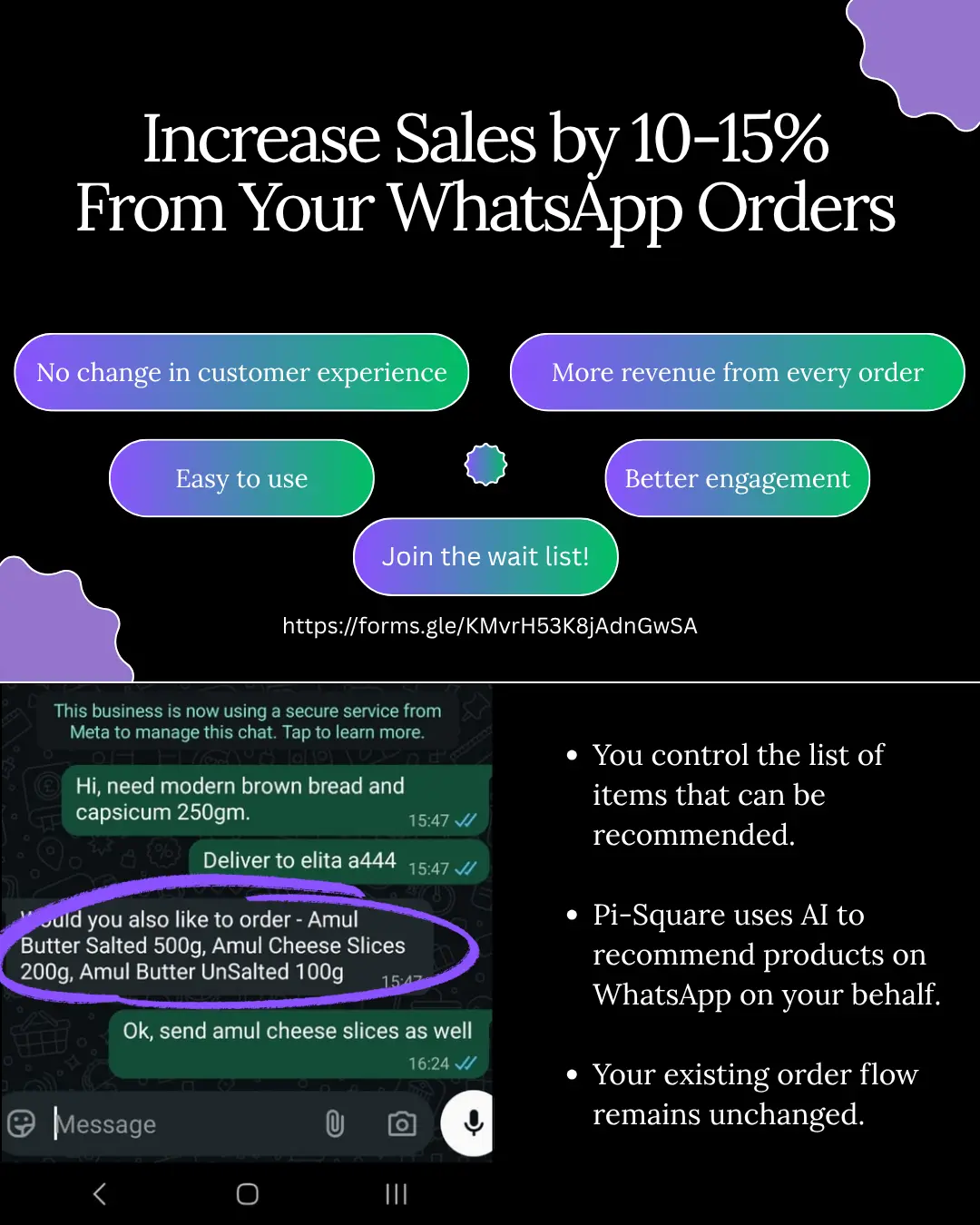
Once volume grows, Pi-Square WhatsApp Upsells can suggest relevant add-ons while the customer orders. You connect your WhatsApp Business account to Pi-Square, and only eligible items from your catalog are suggested. The charge is 10% of the additional sales only. If a customer orders a ₹500 cake and adds a ₹120 box of cookies from the suggestion, the charge is ₹12, and your original ₹500 sale carries no upsell charge.
Label every chat by stage, so no paid order is forgotten and no unpaid order is delivered.
Step 4. Accept payments and stay compliant
Offer one or two simple payment methods, record every payment against an order, and sort out GST, licences and consumer rules before you scale. Both parts protect your cash and your reputation.
Choose how customers pay
| Method | Best for | Watch out for |
|---|---|---|
| UPI ID or QR code | Quick, small orders | You match payments to orders by hand |
| Payment link | Prepaid orders, cards, netbanking | Gateway fee, typically around 2% |
| Cash on delivery | Customers who are new to you | Courier COD charges and refused parcels |
| Advance plus balance | Custom cakes, events, bookings | State your refund terms upfront |
On a ₹1,000 order paid through a gateway at about 2%, the fee is roughly ₹20. The exact rate depends on the gateway, and you pay it to the gateway provider. Shipping and COD charges are billed separately by the shipping provider. If you take UPI or cash, Pi-Square’s manual payment tracking is free, so you can mark orders as paid without a spreadsheet.
Stay compliant with Indian rules
Check these four areas before you scale:
- GST: The usual registration limit is ₹40 lakh turnover for goods and ₹20 lakh for services in most states, and lower in some. Once registered, issue proper GST invoices. Pi-Square can generate GST compliant invoices through settings, but your actual obligations depend on your case, so confirm with a chartered accountant.
- FSSAI: Food sellers, including home kitchens, need FSSAI registration or a licence.
- Consumer rules: State prices, delivery time, your return and refund policy, and a contact number clearly. WhatsApp explains this in its help article on selling online in India.
- WhatsApp policies: Some goods cannot be sold through WhatsApp commerce features. Message only people who contacted you or agreed to hear from you, because unwanted promotions can get your number restricted.
Register for GST and FSSAI when the rules require it, and put your policies in writing before you scale.
Start small and keep it organized
WhatsApp selling comes down to a trustworthy profile, a clear catalog, fast and organized chats, and easy payments that follow the rules. Set up the Business app first, sell to the customers who already message you, and add tools only when a real problem appears, such as lost orders or untracked payments.
When that happens, a link that carries your catalog, orders, payments and invoices keeps them together in one workflow. You can create your free commerce link on Pi-Square and keep selling on WhatsApp while your orders stay organized in one place.