
Blog
Invoice Generator GST: How to Create a GST Invoice Free
Use a free invoice generator GST tool in 4 steps: enter GSTIN, add HSN codes, get CGST, SGST or IGST right and download a PDF invoice.
Published November 3, 2026
To create a GST invoice for free, open an online invoice generator GST tool, enter your GSTIN and your buyer’s details, add each item with its HSN or SAC code and tax rate, and download the PDF. A good tool splits the tax into CGST and SGST, or into IGST, on its own. Once you know which fields matter, the whole job takes about five minutes.
Most small sellers still type invoices in Word, Excel or a WhatsApp message. That is where mistakes creep in: a missing GSTIN, IGST charged on a local sale, a duplicate invoice number. Your buyer then cannot claim input tax credit cleanly, and you lose an evening fixing paperwork.
This guide first covers what a GST invoice must contain, then walks through four steps for making one with a free GST invoice generator, with a worked example in rupees. At Pi-Square we help small sellers across India run orders, payments and invoices from one link, so the checks below focus on what matters most for a small business.
What a GST invoice must include
A GST tax invoice must carry your details, the buyer’s details, the item details and the tax split. Knowing this list lets you judge any GST invoice maker in under a minute.
The fields every tax invoice needs
Rule 46 of the CGST Rules sets out the required content. In practice, your invoice needs:
- Your name, address and GSTIN
- A unique invoice number of up to 16 characters (letters, numbers, hyphen, slash), in sequence within the financial year
- The invoice date
- The buyer’s name and address, plus their GSTIN if they are registered
- A description of each item with its HSN code (goods) or SAC code (services)
- Quantity, unit and taxable value after discount
- The rate and amount of CGST, SGST or IGST, and cess if it applies
- The place of supply, whether reverse charge applies, and a signature
For services, issue the invoice within 30 days of providing the service.
A GST invoice is only as good as its GSTIN, its HSN or SAC code and its place of supply.
CGST, SGST and IGST: which one applies
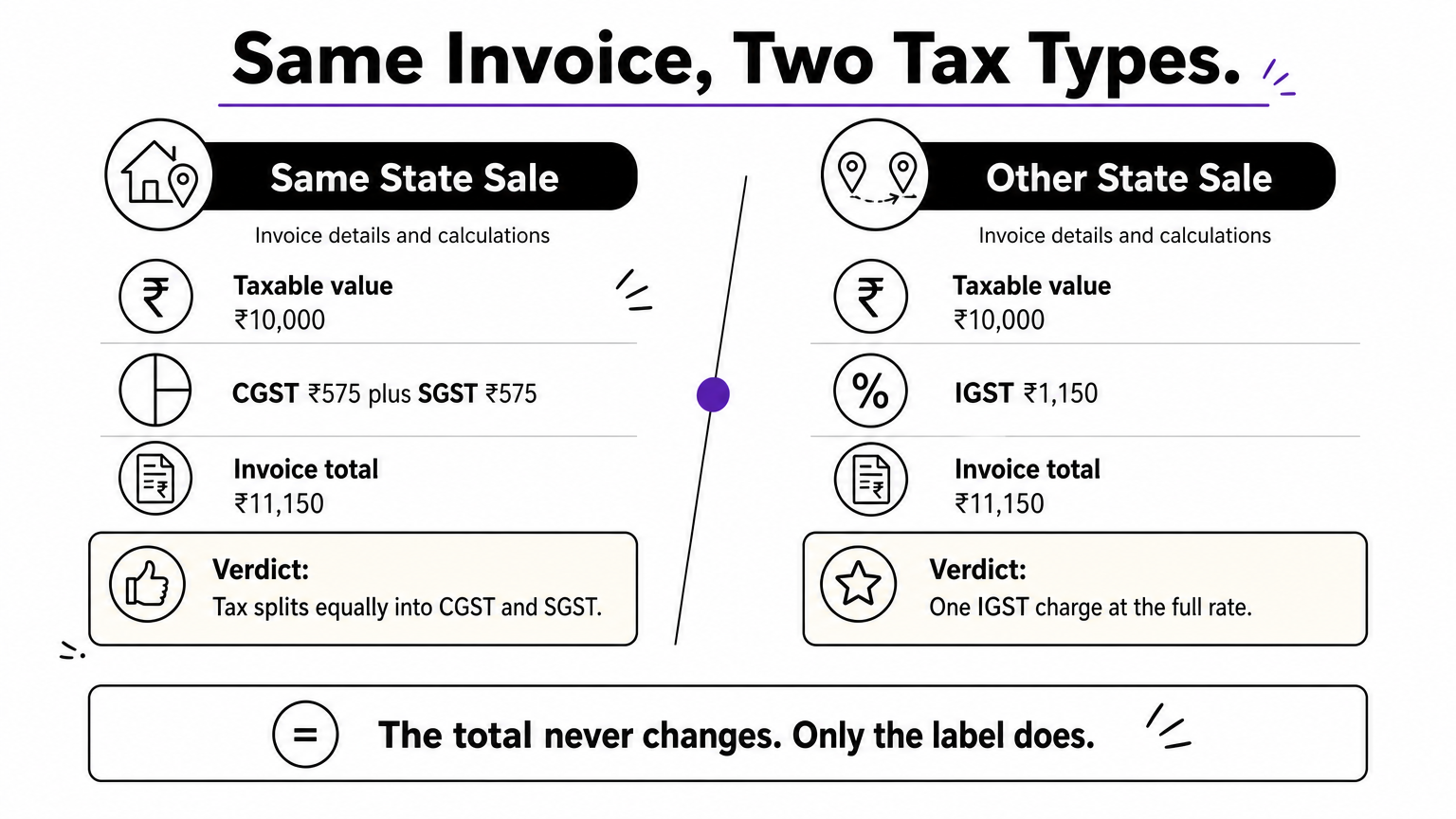
Place of supply decides the tax type. When you and the buyer are in the same state, the GST rate splits equally into CGST and SGST. An 18% rate becomes 9% plus 9%. When the supply crosses state lines, you charge a single IGST at the full rate. A reliable generator switches between the two when you change the state.
When you should not issue a tax invoice
Only GST-registered sellers can charge GST. If you are under the composition scheme, you issue a bill of supply and collect no tax from the buyer. The same applies to exempt supplies. Also note that businesses above ₹5 crore aggregate turnover must generate e-invoices through the government’s Invoice Registration Portal. A free generator does not do that for you.
No GSTIN, no GST: unregistered and composition sellers issue a bill of supply instead.
Step 1. Choose a free GST invoice generator
Pick a tool that does the tax math itself and lets you download without a watermark. Features matter more than brand here, because free tools differ a lot in what they hide behind a paywall.
What to look for
Check for these before you type anything:
- Automatic CGST, SGST and IGST switching based on place of supply
- Separate fields for GSTIN, HSN or SAC code, and a different tax rate on each line
- A discount field that reduces taxable value before tax
- PDF download with no watermark
- A custom invoice number, your logo, and space for bank or UPI details
Run a quick test. Enter the sample from Step 3 and compare the result with your own calculation. If the tool gets it wrong, close the tab.
Standalone tool or invoicing inside your store
A browser-based free GST invoice generator is enough when you issue a few invoices a month. The cost is retyping: every invoice starts from a blank form, with no link to the order or the payment. If you already take orders through WhatsApp or a link, generating the invoice from the order removes that duplication. Pi-Square, for example, creates GST compliant invoices through simple settings and keeps them next to your orders and daily sales dashboard. You can start free. Your actual compliance duties still depend on your own situation, so confirm them with your tax advisor.
Use a standalone tool for occasional bills, and invoicing built into your orders once volume grows.
Step 2. Enter seller and buyer details
Start with details that stay the same on every invoice, then add the buyer. Accuracy here prevents most corrections later.
Your business details
Type your legal or trade name, address and GSTIN exactly as they appear on your registration certificate. A GSTIN has 15 characters, and the first two digits are the state code, such as 27 for Maharashtra, 29 for Karnataka or 07 for Delhi. Next, set an invoice number series that restarts each financial year, which runs April to March. For 2026-27, a pattern like INV/26-27/001 is 13 characters and stays within the limit. Never reuse a number.
Buyer details and place of supply
For a business buyer, enter their GSTIN and ask them to confirm it, because a wrong digit blocks their tax credit. For a consumer, the name, address and state are enough. Then set the place of supply. For goods, this is usually the state where the goods are delivered, which can differ from the billing address. If a buyer in Pune asks you to ship to Bengaluru, the delivery state drives the tax type.
Choose the place of supply before you add items, because it decides whether you charge CGST and SGST or IGST.
Step 3. Add items, codes and tax rates
Add one line per item, with its code, quantity, price, discount and rate. The generator then computes taxable value, tax and total.
Fill each line correctly
Enter a clear description, the HSN or SAC code, quantity, unit price and any discount. A discount shown on the invoice reduces the taxable value, so GST applies to the lower amount. For HSN digits, sellers with turnover up to ₹5 crore need 4 digits on B2B invoices, and larger sellers need 6. Check the current notification if you are near the limit.
For the rate, look up each item in the official GST rate schedule or ask your accountant. Since the rate overhaul of September 2025, most goods and services fall under 5% or 18%, with 40% on a short list of items and special rates such as 3% on gold. Do not copy a rate from an old invoice.
Worked example: same invoice, two tax types
Say you sell two products at illustrative rates:
| Item | Qty × price | Taxable value | GST rate | GST |
|---|---|---|---|---|
| Product A | 10 × ₹500 | ₹5,000 | 5% | ₹250 |
| Product B | 4 × ₹1,250 | ₹5,000 | 18% | ₹900 |
| Total | ₹10,000 | ₹1,150 |
For a buyer in your own state, the generator shows CGST ₹575 and SGST ₹575, and the invoice total is ₹11,150. For a buyer in another state, it shows IGST ₹1,150 and the same total of ₹11,150. The total never changes. Only the label does.
If the total changes when you switch between CGST/SGST and IGST, the tool is calculating wrongly.
Step 4. Check the totals and download the PDF
Review the preview once, download the PDF, and send it. Two minutes of checking saves a credit note later.
Verify before you download
Run through this list:
- Both GSTINs have 15 characters and the state code matches the address
- The tax type matches the place of supply
- Taxable value plus tax equals the invoice total
- The invoice number is new and the date is correct
- The amount in words matches the figure
Download, share and store
Save the PDF under the invoice number, for example INV-26-27-001.pdf, and send it by email or WhatsApp. Keep a copy and record the sale in your sales register, because outward supplies feed your GSTR-1 return. Never edit an issued invoice. If a figure was wrong, issue a credit note or debit note instead. If you sell through a link or WhatsApp, an order-linked invoice, like the ones Pi-Square generates, saves you from rebuilding this record by hand.
Treat an issued invoice as final, and fix mistakes with a credit or debit note.
Make your next invoice a quick one
A GST invoice is a short list of fields done right: valid GSTINs, the correct HSN or SAC code, the right rate, and CGST with SGST or IGST chosen by place of supply. Pick a generator that calculates tax automatically, test it against a sample, and check the preview before you send.
If you want invoices tied to your orders and payments instead of retyped each time, you can start free on Pi-Square and set up GST invoicing for your business.