Blog
Software for Billing in GST: 8 Best Free and Low-Cost Tools
Compare 8 free and low-cost options for software for billing in GST, with plans, limits and a test invoice to check any tool before you commit.
Published November 19, 2026
The best software for billing in GST creates a correct tax invoice, splits CGST, SGST and IGST by itself, and costs little or nothing while your volume is small. Pi-Square suits sellers who take orders on WhatsApp, Vyapar suits phone-based counter billing, and Zoho Invoice and myBillBook suit plain invoicing. GimBooks, ProfitBooks and Refrens suit owners who also want returns and reports.
Most small businesses start by typing bills in a word processor or a spreadsheet. That works until a buyer’s accountant rejects an invoice for a missing HSN code, or a wrong tax split delays someone’s input credit. A good billing tool removes those errors before the bill reaches the customer. This article compares eight free and affordable options, shows what each does, who it fits and what it costs, and then explains what a GST invoice must contain so you can test any tool yourself.
We build Pi-Square for small sellers, so it comes first, and we say plainly where it fits and where it does not. The other seven are judged on the same three points. Plan limits and prices change, so confirm them on each vendor’s page before you pay.
1. Pi-Square: GST invoices for WhatsApp and web sellers
Pi-Square is a commerce platform with GST compliant invoices built in, so it fits best when you also need to take orders, bookings or payments, not only print bills.

If your customers already order on WhatsApp, billing works best when it sits in the same place as the order.
What it does
You set GST at the business level and again at the item level, so every product, delivery charge and custom order charge carries the right tax. Invoices come out of those settings, and you can also create a bill by hand for a walk-in sale.
- Direct, WhatsApp and manual orders in one list, each with a fulfillment status
- Manual payment tracking for cash, UPI and other modes, free of cost
- Real-time inventory with an availability toggle per item
- A daily sales dashboard that keeps your bills organized
Who it suits
Pick it if customers already message you to order. Home bakers, boutiques, local grocers, event hosts and service providers get a shareable link, and customers do not need to install an app. Orders, payments and invoices end up in one workflow instead of scattered chats.
Do not make it your only tool if you need full accounting or GST return filing. Its focus is selling and billing, so confirm any e-invoicing or filing need with your tax advisor. Pi-Square helps you configure and calculate GST, but your actual obligations depend on your own circumstances.
Pricing and limits
You start free and upgrade when volume grows. Only Growth has no monthly order cap, while Free and Pro do.
- Free, ₹0: 10 items, 30 orders a month, 1 staff account, no custom domain
- Pro, ₹300 a month or ₹3,000 a year: 100 items, 300 orders a month, 3 staff accounts, custom domain
- Growth, ₹1,000 a month or ₹10,000 a year: 10,000 items, unlimited orders, 10 staff accounts, custom domain
Payment gateway charges are typically around 2% of order value and go straight to the gateway. Shipping and COD charges are billed by the shipping provider. Pi-Square also applies a 10% charge on WhatsApp upsells, only on the additional sales they bring in.
2. Vyapar: mobile billing that works offline
Vyapar is a mobile-first billing app that keeps working without internet, which makes it a strong pick for shops where the connection drops.
Offline billing matters most where the network is weak, but e-invoicing still needs a live connection.
What it does
Vyapar’s Android app handles everyday GST billing on your phone, and you can create invoices offline and sync them once you are back online. It also supports barcode billing and sharing bills over WhatsApp.
- GST invoices created from the phone
- Offline invoicing with later sync
- Barcode scanning at the counter
- Bills shared to the customer on WhatsApp
Who it suits
Retail shops, traders and small counters that bill all day from one phone fit well. If you run a grocery, electronics or stationery counter, speed at the till matters more than deep reports.
Businesses with complex books may outgrow it, because its accounting features are lighter than a full accounting package. Test sync across two devices during the trial before you move your records.
Pricing and limits
The basic mobile app is free, and paid plans add more features. A desktop version is sold separately, so decide early whether you want one.
Plan prices change often, so read the current price inside the app before you buy. Also check whether you can still view and export your invoices if you stop paying.
3. myBillBook: simple GST and non-GST invoices
myBillBook is a small-business billing tool that creates both GST and non-GST invoices, so it handles a mixed set of sales without switching software.
A tool that issues both tax invoices and plain bills saves you from running two systems.
What it does
You create invoices, manage inventory and track payments from one account. The GST and non-GST option is the useful part, because not every sale of yours may attract tax.
- GST and non-GST invoice formats
- Inventory records linked to your sales
- Payment tracking so you can see who still owes you
Who it suits
It fits shops and small traders who want a plain tool and do not want to learn accounting terms. A composition-scheme dealer, for example, issues a bill of supply instead of a tax invoice, and a non-GST format helps there.
It is less suited to owners who want full accounting statements from the same tool. If you need balance sheets and ledgers, compare it against ProfitBooks or Refrens below.
Pricing and limits
Pricing is aimed at small businesses, but plan details change, so open its pricing page before you decide.
- How many invoices the free option allows
- How many users can log in
- Whether e-invoicing and e-way bills are included
- Whether you can export all your data
4. Zoho Invoice: free online GST invoicing
Zoho Invoice is a free GST invoicing tool for Indian businesses, and it suits you when the job is sending clean invoices and collecting payments online.
If you only need invoices and payment links, a free invoicing tool beats a full accounting package.
What it does
You create and send GST invoices from a web account and let customers pay online. It is built around invoicing, so it stays quick to learn.
- GST invoices sent to the customer directly
- Online payment collection on the invoice
- A path to Zoho Books if you later need accounting
Who it suits
Consultants, freelancers, agencies and service providers who bill a limited number of clients get the most from it. You send an invoice, the client pays, and you move on.
A shop that sells many items across a counter will find it thin. Inventory-heavy businesses should look at Vyapar, ProfitBooks or Pi-Square instead.
Pricing and limits
Zoho Invoice is free. When you need full books, Zoho Books is the paid product, with an entry plan listed around ₹749 a month on annual billing at the time of writing.
Confirm that the free invoicing tool covers your invoice volume and the number of people who need access. Check the current plan page, because Zoho changes its tiers from time to time.
5. GimBooks: GST billing with returns and e-way bills
GimBooks is a GST billing app that also covers e-invoices, e-way bills and GSTR returns, so you can bill and file from one place.
Pick a tool that files returns only if you would otherwise pay someone to do it.
What it does
You create GST invoices, e-invoices and e-way bills, and file GSTR returns, with more than 50 voucher types for other documents. That range is wider than most simple billing tools.
- GST invoices and e-invoices
- E-way bills for goods in transit
- GSTR return filing from your billing data
- 50+ voucher types, such as quotations and credit notes
Who it suits
Traders and small manufacturers who move goods between states benefit, because e-way bills sit beside invoices. Owners who want one tool for billing and returns also fit.
If you only issue a few service invoices a month, you will not use most of it. A lighter tool such as Zoho Invoice is easier then.
Pricing and limits
The vendor presents it as an app you can start with at no cost, but the line between free and paid features matters here.
Before you commit, check which of e-invoicing, e-way bills and return filing are included in the free tier, and which need a paid plan. Pricing pages change, so read the current one.
6. ProfitBooks: free plan with accounting depth
ProfitBooks is online accounting software with a free plan, and it suits owners who want GST invoices and proper reports in the same account.
A free plan is a good start only if the upgrade path is clear before you outgrow it.
What it does
It generates GST invoices and e-invoices, keeps inventory in sync with GST calculations, and offers more than 45 financial reports. A mobile app lets you bill from your phone, and team members can work in the same account.
- GST invoices and e-invoices
- Inventory linked to tax calculations
- 45+ reports, including financial statements
- Mobile app and team access
Who it suits
Small businesses that want to see profit, outstanding payments and GST liability without hiring a bookkeeper find it useful. It sits between a simple billing app and a heavy accounting package.
Its vendor says advanced manufacturing features are not its strongest area. A factory with complex production costing should test it carefully first.
Pricing and limits
The Startup plan is free, and the SMB plan is listed at ₹749 a month with unlimited usage and priority support. The free plan has limits, so check them against your invoice volume.
Pricing is the vendor’s own, so confirm it on the current pricing page. Ask what changes on the day your free trial ends, so no feature disappears without warning.
7. Refrens: invoicing and accounts in one place
Refrens is a billing and accounting platform with a free Basic plan, and it suits people who run more than one business from a single login.
Refrens charges for its GST features, so judge it on the paid tier, not the free one.
What it does
You create invoices, quotations, credit and debit notes and payment receipts, all connected to the accounts. You can also operate several businesses from one account, with an audit trail of changes.
- Invoices, quotations, credit and debit notes
- Several businesses from one account
- Audit trail for every change in the records
- Balance sheet, profit and loss and trial balance reports
Who it suits
Freelancers, agencies and consultants with more than one business or brand benefit most. The accounts side suits people who want their invoicing and books to match.
If you only need a free GST invoice and nothing more, it is more than you need, and its GST features cost money.
Pricing and limits
The free Basic plan covers invoicing, expense tracking and client management. The GST features sit on paid plans.
| Plan | Price | What you get |
|---|---|---|
| Basic | Free | Invoicing, expense tracking, client management |
| Accounts Lite | ₹4,700 a year | Unlimited documents, no branding, reports |
| Accounts GST | ₹12,000 a year | GST reports, e-invoicing, e-way bills, GSTR-2B reconciliation |
| Accounts | ₹14,000 a year | Ledgers, journals, balance sheet, 5 team members |
8. GSTN free software: the government route
GSTN makes free accounting and billing software available through the GST portal, and MSMEs with turnover below ₹1.5 crore can download it at no cost.
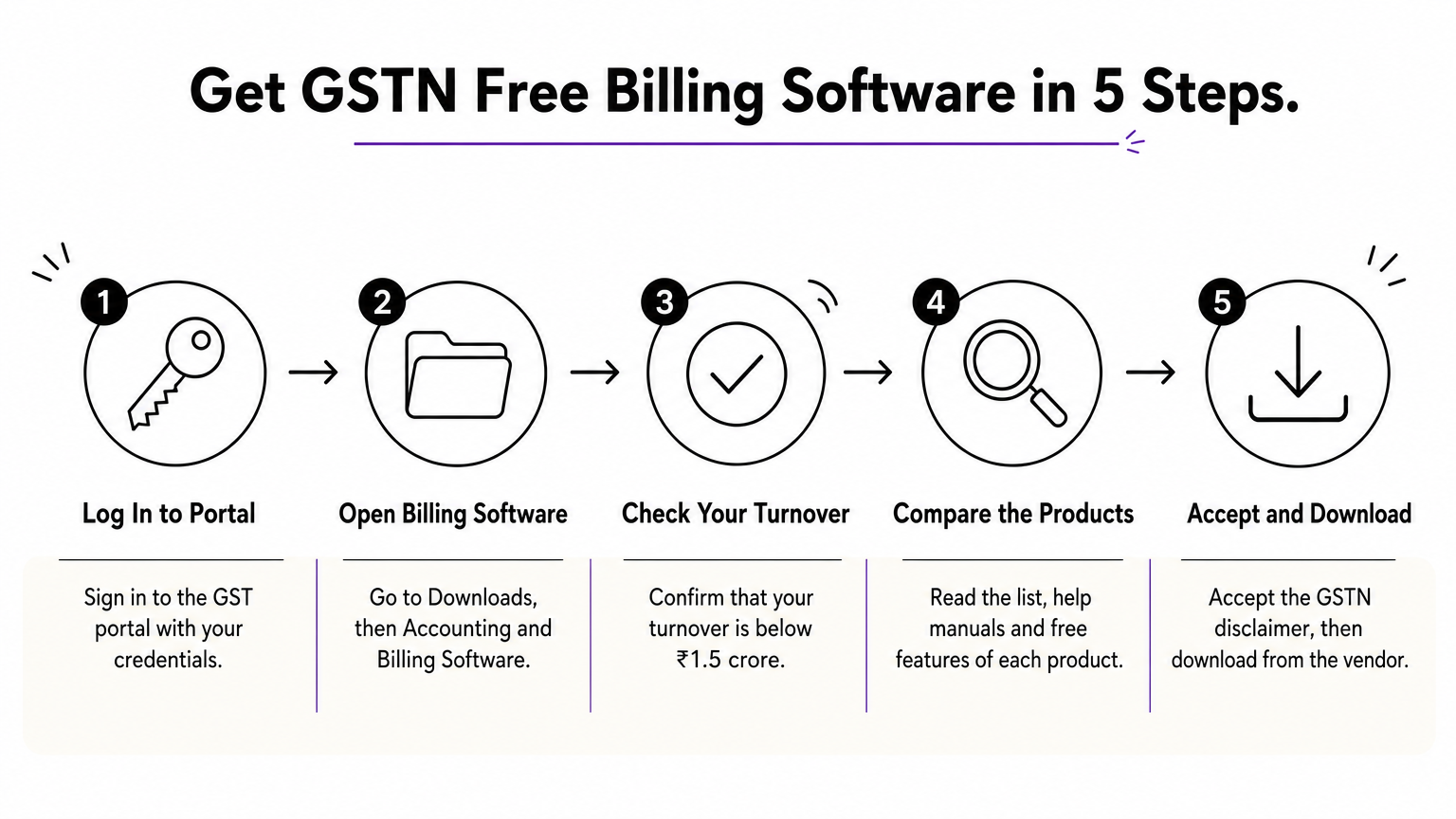
The cheapest legitimate option is already on the GST portal, if your turnover qualifies.
What it does
The portal lists software from companies empanelled by GSTN, with version, system requirements, support details and the features offered free. A “Common Free Features” link shows what every listed product covers. You then download the product from the vendor.
- Log in to the GST portal with your credentials.
- Go to Downloads, then Accounting and Billing Software.
- Confirm that your turnover is below ₹1.5 crore.
- Read the list, help manuals and free features of each product.
- Accept the GSTN disclaimer, which takes you outside the portal to the vendor’s download.
Who it suits
It suits very small businesses that want no-cost software from a GSTN-approved list and are comfortable installing it. It also helps you compare several vendors in one place.
It does not suit sellers who need online stores, WhatsApp orders or a mobile-first experience. Free features differ by vendor, and the support comes from the vendor, not from GSTN.
Pricing and limits
The software is free of cost to taxpayers who meet the turnover condition. Each vendor may offer paid upgrades beyond the free features.
Read the free feature list of each product before you install it. If a feature you need, such as e-way bills, is not on that list, you will pay the vendor for it.
How the eight options compare
Most of these tools offer a free way in, but the free part has limits, so compare the cap, not the label. The table below sets the eight side by side.
| Tool | Free option | Best for | Watch out for |
|---|---|---|---|
| Pi-Square | Free plan: 10 items, 30 orders a month | WhatsApp and web sellers, bookings | Not a full accounting or filing tool |
| Vyapar | Free basic mobile app | Counter retail, offline billing | Lighter accounting depth |
| myBillBook | Check its free tier | GST and non-GST bills | Invoice and user limits |
| Zoho Invoice | Free | Service providers | Accounting needs paid Zoho Books |
| GimBooks | Check its plan page | Traders needing e-way bills and returns | Which features are free |
| ProfitBooks | Free Startup plan, SMB at ₹749 a month | Owners who want reports | Free plan limits |
| Refrens | Free Basic plan | Several businesses, one login | GST features start at ₹12,000 a year |
| GSTN list | Free under ₹1.5 crore turnover | Very small MSMEs | Free features vary by vendor |
A free plan is free only until you cross its cap, so count your monthly bills before you choose.
Which tools are truly free
Free billing software with GST usually means a free plan with a cap. Zoho Invoice and the GSTN list are free for core invoicing, while Pi-Square, Vyapar’s mobile app, ProfitBooks and Refrens Basic are free up to a limit on items, orders, users or GST features.
Work one example. A boutique that issues 150 bills a month, each as an order, exceeds Pi-Square’s free limit of 30 orders. Pro costs ₹3,000 a year, which is ₹250 a month, against ₹3,600 if you pay ₹300 monthly. That is still cheaper than most paid accounting plans above.
Picking by type of business
Start from what you sell, not from the longest feature list. Match your situation to the tool built for it.
- Orders arrive on WhatsApp, or you take bookings and advance payments: Pi-Square
- You bill at a counter and the network drops: Vyapar
- You send invoices to a few clients: Zoho Invoice
- You move goods and need e-way bills and returns: GimBooks
- You want reports and a free start: ProfitBooks
- You run several businesses: Refrens
- Your budget is zero and turnover is under ₹1.5 crore: the GSTN list
What a GST invoice must include
A valid GST tax invoice carries your GSTIN, a unique serial number, the tax split and the place of supply, and any tool you pick must produce all of them without manual fixes.

If a tool cannot show the tax split on the invoice, drop it, whatever else it offers.
Fields every tax invoice needs
Check a sample invoice from each tool you trial against this list. The rules sit in the CGST Rules, and your tax advisor can confirm details for your case.
- Your name, address and GSTIN
- An invoice number in a consecutive series, unique for the year, up to 16 characters
- The invoice date
- The buyer’s name and address, plus their GSTIN if they are registered
- A description of each item with HSN or SAC code, quantity and unit
- Taxable value, tax rate and the tax amount split into CGST, SGST or IGST
- Place of supply, with the state
Composition scheme dealers issue a bill of supply and do not charge GST, so a tool must offer that format if it applies to you. E-invoicing is mandatory above ₹5 crore turnover, so a growing business should confirm that its tool supports it.
A quick test for any tool
Run one dummy invoice before you trust a tool with real sales. Enter an item priced at ₹1,000 with 18% GST. For a sale within your state, the invoice should show CGST ₹90, SGST ₹90 and a total of ₹1,180. For a sale to another state, it should show IGST ₹180 and the same total.
Then check three things. Does the invoice number continue in sequence after you create a second bill? Can you export every invoice to a file? Does the free plan stop you at a limit you will hit within three months?
Choosing your GST billing tool
The right tool depends on how you sell. Pick Vyapar for counter billing, Zoho Invoice for service invoices, ProfitBooks or Refrens for accounting, GimBooks for e-way bills and returns, and the GSTN list when budget is zero. Whatever you choose, run the ₹1,000 test invoice first, and confirm what the free plan caps.
If your customers already order on WhatsApp, or you take bookings and advance payments, keep billing with the orders. You can create your Pi-Square link free and see GST invoices, order tracking and payments in one workflow before you pay for anything.