Blog
Link for Payment: What It Is, How to Create and Send One
What a link for payment is, how to create, generate and send one, and how Stripe, Razorpay, Zoho and Cashfree compare, with a worked cost example.
Published October 26, 2026
A link for payment is a unique web address that opens a secure checkout page for one specific purchase. You create it inside a payment tool and send it over WhatsApp, SMS, email or social media. Your customer taps it and pays on their own phone with whichever methods your provider supports, such as cards, UPI or wallets. You do not need a website or a shopping cart.
You will also see it called payment by link, pay by link or an online payment link. The idea is the same everywhere. The link carries the amount, the purpose and the checkout, so you stop reading out bank details and waiting for screenshots.
This guide explains why a payment link matters, how to create, generate and send one, and how providers like Stripe, Razorpay, Zoho and Cashfree compare. It also shows where a single-amount link stops being enough. Pi-Square builds commerce links for small sellers in India, so we cover that case with real plan figures too.
Why a payment link matters for your business
A payment link matters because it removes three things that slow small sellers down: building a website, sharing bank details by hand, and chasing confirmation. You send one message and the money arrives with a record attached.

What a link does that bank details do not
When you share a UPI ID or bank account, the customer types the amount themselves. They may get it wrong, pay the wrong person, or send a screenshot hours later. You then check your statement and match the payment to the order by hand.
With a payment link, the amount and purpose are fixed before the customer sees the page. The provider confirms the payment automatically and notifies you. You can also see which order each payment belongs to, which matters once you handle more than a few sales a week.
A payment link turns “please pay me” into a finished transaction with a record attached.
Where payment with a link fits
Payment links suit any sale that happens in a chat, on a call or in person. Common uses include:
- An advance for a booking, class or custom order
- A balance payment after delivery
- A consultant’s or tradesperson’s fee
- Event registrations and stall bookings
- Donations
- A nudge to a customer who left without paying
Hotels and service businesses also send links, or QR codes, so staff never take card numbers over the phone.
Two kinds of link
A plain payment link collects one amount for one purpose. A commerce link opens a catalog, booking page or store where the customer picks items and then pays. The first is the quickest way to get paid. The second is the better choice once customers choose between products, sizes or time slots, and you want orders and invoices recorded without extra work.
How to create, generate and send a payment link
To create a payment link, open your provider’s dashboard, enter the amount and purpose, set the link’s rules, generate it, and send it. The whole job takes a few minutes, and no code is involved with the main providers.
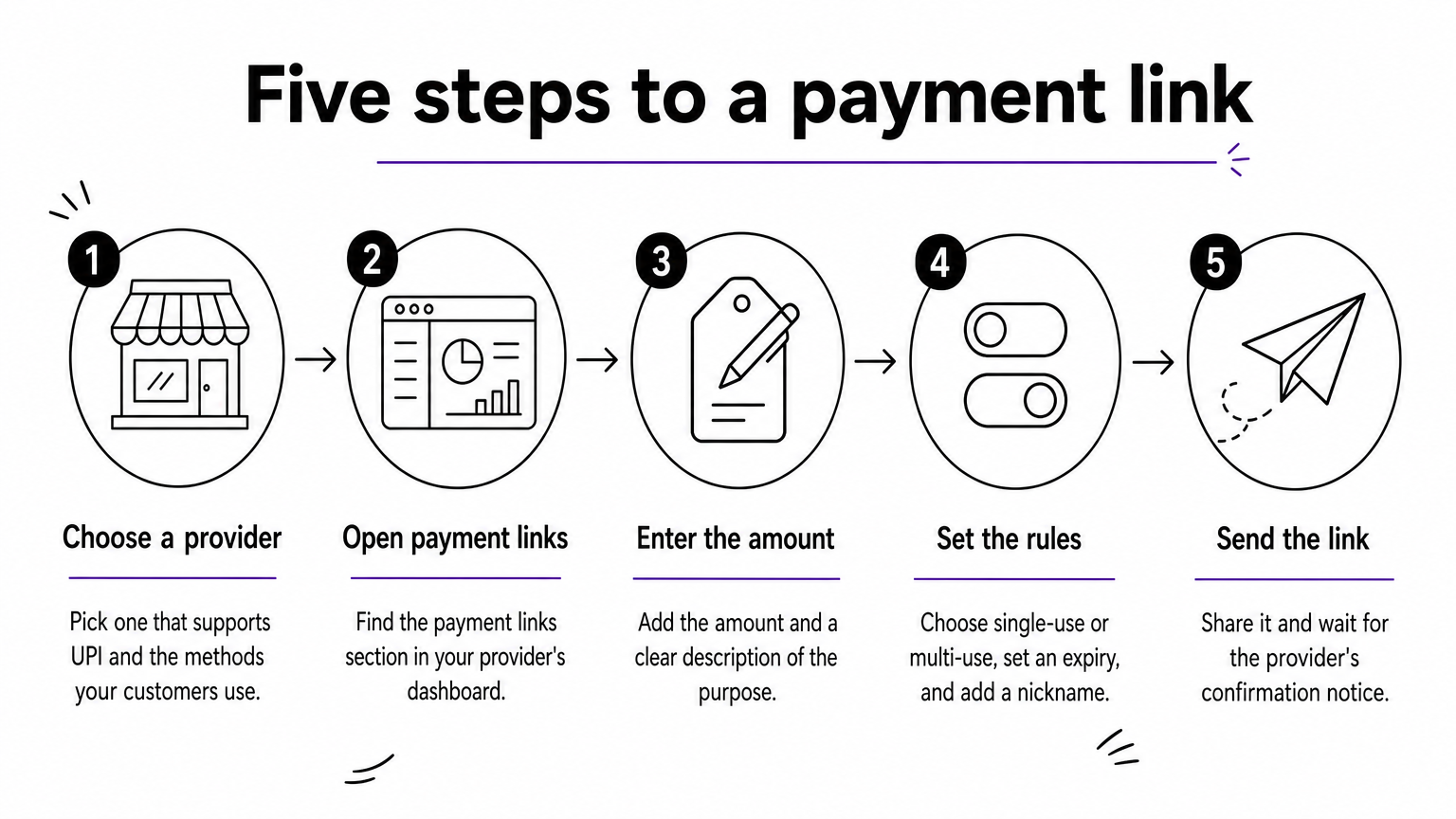
The steps, in order
- Choose a provider that works for businesses in India and supports the payment methods your customers use, especially UPI.
- Open the payment links section. In Zoho Payments, for example, you go to Payment Links and enter the amount, purpose and customer details.
- Enter the amount and a clear description, so the customer knows what they are paying for.
- Set the rules described below, then generate the link.
- Send the link and wait for the confirmation notice, which arrives by dashboard or email.
Settings to check before you generate
Most tools let you choose a single-use or multi-use link. Use single-use for one customer’s invoice and multi-use for a fixed-price item you post publicly. Set an expiry date so an old link cannot be paid by mistake. Give each link a nickname you will recognize later, and add your logo and a short description if the tool allows branding.
How to send it so people actually pay
Paste the link into WhatsApp, SMS, email or an Instagram message. For counters, flyers and events, turn it into a QR code. Keep the message short and put the amount in plain words, because a bare link looks like spam. You can copy this template:
Hi [Name], thanks for your order of [item].
Amount: ₹[amount]
Pay securely here: [link]
The link expires on [date]. Reply here once you have paid and I will confirm.
Send the link with the amount and the reason written beside it, so the customer trusts it before they tap.
Stripe, Razorpay, Zoho and Cashfree compared
All four let you generate a payment link without a website, so the differences lie in how each presents its tool and what else it offers. Compare them on the points below, then confirm current fees and settlement terms on each provider’s own pricing page.
What each provider says it offers
| Provider | What its payment links offer |
|---|---|
| Stripe | Sell online without a website. Build a full payment page in a few clicks and share the link, no code required. |
| Razorpay | A payment link generator to create and share links, and accept payments without a website. |
| Zoho Payments | Create links from the dashboard by entering the amount, purpose and customer details to generate a secure link. |
| Cashfree | Branded links in seconds, no code or website needed, with 180+ payment methods listed. |
| Pi-Square | A shareable commerce link for products, orders, bookings, advance payments, digital items and donations. Customers need no app. |
The first four are strongest at one job: turning an amount into a link. Pi-Square covers the wider flow around the sale, which section four explains.
How to choose between them
Run through these questions in order:
- Does it support UPI and the methods your customers prefer?
- What does it charge per transaction, and how quickly do you receive the money?
- Do you need invoices or order records, or only payment confirmation?
- Will customers pay a single amount, or choose from products and time slots?
- Can you sign up quickly with the documents you already have?
Do not choose on the headline feature list alone. A tool with 180 payment methods does little for you if your customers all pay by UPI.
Choose the provider that matches how your customers pay, not the one with the longest feature list.
When a commerce link beats a plain payment link
A commerce link beats a plain payment link when customers choose what to buy, or when you need orders, stock and invoices recorded. A payment link only collects money. A commerce link runs the sale from browsing to payment to follow-up.

What Pi-Square’s link covers
With Pi-Square you create your link in the app in minutes and share it anywhere. Your link is a web address of its own, in the form yourname.psq.site, so it looks like a normal website and is easy to read out or print. Customers do not install an app to browse, order, book or pay. The same link can sell products, take bookings and advance payments, and collect payments for digital items and donations.
Behind it, you can connect a payment gateway or track payments manually across cash, UPI and other modes. Manual tracking is free. You also get order management with fulfillment status, real-time inventory, and GST compliant invoices through simple settings. Pi-Square helps with GST configuration and calculation, but your actual obligations depend on your circumstances,
so confirm them with your tax advisor.
Three site modes, one way to get paid
Pi-Square lets you choose how much of your shop customers see. Pick the site mode that fits your business:
- Online store: a full commerce store where customers browse and place orders themselves.
- Online catalog: customers can view your catalog but cannot order on the site. They contact you, and you take the order.
- Business website: customers see only a static website. The catalog stays hidden.
In all three modes, you can create manual orders and share the order link with the customer. The customer uses that link to pay, and you use it to track the payment. This is the closest Pi-Square comes to a plain payment link, and it works even when your public site does not take orders.
Automatic or manual payment tracking
You choose how payments are recorded:
- Connect a payment gateway and payments are tracked automatically.
- Use your own UPI and track payments manually. This costs nothing extra.
You can start with UPI and add a gateway later, once your order volume makes automatic tracking worth the gateway fee.
A worked example with real figures
Say you run a home bakery with an average order of ₹500. Gateway fees are typically around 2% of order value, but the exact rate depends on your gateway, and you pay it to the gateway, not to Pi-Square.
| Plan | Price | Orders | Items | Staff accounts | Custom domain |
|---|---|---|---|---|---|
| Free | ₹0 / month | 100 / month | 100 | 2 | No |
| Pro | ₹300 / month (₹3,000 / year) | Unlimited | 1,000 | 5 | Yes |
At 60 orders a month, you sell ₹30,000 and pay about ₹600 in gateway fees. The Free plan covers you. At 150 orders, you sell ₹75,000 and pay about ₹1,500 in gateway fees, plus ₹300 for Pro. That is ₹1,800 in total, about 2.4% of sales, in return for unlimited orders, a custom domain and a bigger catalog.
If customers choose what to buy, a commerce link saves you the order-keeping that a plain payment link leaves to you.
Keeping payment links safe and avoiding common mistakes
Treat every payment link like cash. Send it to the right person, give it an end date, and check the payment landed before you hand over the goods.
How links stay secure
Link payments use hosted checkout pages, so the provider runs the encryption, fraud screening and card-data standards such as PCI DSS. You never see or store card numbers. That lowers your risk, but it does not remove your duty to handle customer data properly.
Customers also need protection from fake links. Always send links from a number or account they recognize. Tell them the payment page will show your provider’s name, and never ask anyone to type card details into a chat. Prefer single-use links with an expiry for individual orders.
Mistakes that cost sellers money
- Entering the wrong amount and sending the link before checking it
- Leaving an old link live after the order is cancelled
- Treating a customer’s screenshot as proof of payment instead of waiting for provider confirmation
- Mixing payment-link money with cash and UPI in separate notebooks
- Skipping invoices, which makes GST filing and repeat-customer records harder later
Fix the last two by recording every sale in one place. A dashboard that logs orders, payments and invoices together makes reconciliation a daily glance rather than a month-end task.
Send your first payment link today
A link for payment is the quickest way to collect money online without a website. You enter an amount, set the rules, generate the link and send it where your customer already is. Stripe, Razorpay, Zoho and Cashfree all do this well. Which one fits you depends on your payment methods, fees and how much record-keeping you need.
If your customers also choose products, book slots or pay advances, a single-amount link will soon feel limiting. You can create your commerce link with Pi-Square on the free plan, share it on WhatsApp and see how the sale, payment and invoice fit in one flow.