Blog
7 Best Event Ticketing Platforms in India, Free and Paid
Compare 7 options to find the right event ticketing platform for your event in India: free plans, fees, payouts and who each one suits.
Published November 7, 2026
The best event ticketing platform is the one whose fee model fits your ticket price and your audience, not the one with the longest feature list. If you run a small event in India and want to start at ₹0, Pi-Square and Luma are the easiest places to begin. Townscript suits regional workshops and sports events. Eventbrite suits public events that need help finding buyers. Zoho Backstage suits multi-session conferences, and Ticket Tailor or TicketSource suit seated shows.
Choosing is harder than it looks. Almost every platform says it is free, yet most charge per ticket, per payment, or both. A fee that barely touches a ₹5,000 ticket can eat a large share of a ₹200 one. Many tools also assume buyers pay by card, while your crowd may pay by UPI or want to book over WhatsApp.
This guide compares seven platforms on how they work, what they cost and who they suit. It then sets their fees side by side with a worked example for 100 tickets. Fees for the six non-Pi-Square platforms come from their published pricing, mostly in dollars, so check the current rate card in rupees before you commit.
1. Pi-Square
How it works

Pi-Square gives you a shareable event page in minutes from its mobile app or web app. You list tickets, registrations, stalls or advance-paid seats, share the link on WhatsApp or Instagram, and buyers book without installing an app.
Around the ticket sits a selling layer that most pure ticketing tools lack. Coupons with percentage or fixed discounts, expiry dates and order limits cover early-bird offers. WhatsApp upsells suggest add-ons or combos while someone orders, such as a snack combo with a show ticket. You also get GST-compliant invoices and a daily sales dashboard. Buyers can order through WhatsApp or direct through the link, whichever flow you enable.
Pricing and fees
Pi-Square prices by plan, and the payment gateway fee is separate. You can start at ₹0 and upgrade only when volume demands it.
- Free: ₹0 per month, 100 orders a month, 100 items, 2 staff accounts.
- Pro: ₹300 per month or ₹3,000 per year, unlimited orders, 1,000 items, 5 staff accounts, custom domain.
- Growth: ₹1,000 per month or ₹10,000 per year, 10,000 items, 10 staff accounts, AI chatbot as an add-on.
- Other charges: gateway fees run around 2% of order value and go to the gateway, manual payment tracking for cash and UPI is free, and WhatsApp upsells carry a 10% charge only on the additional sales.
Who it suits
Pi-Square works as an event ticketing platform for organizers in India who already sell on WhatsApp or Instagram. Think workshop hosts, class teachers, pop-up and stall organizers and fundraisers. If you take an advance payment or sell a ticket plus add-ons, one link keeps everything organized.
If your event needs a reserved-seating map or gate scanning, ask Pi-Square or check its event booking demo first. Compare it with Ticket Tailor or TicketSource, which list those features.
Pi-Square fits organizers who sell through WhatsApp and want tickets, add-ons and invoices in one place.
2. Townscript
How it works
Townscript is a self-serve platform for workshops, conferences, sports and fitness events, and meetups. It is especially popular across India and Southeast Asia. You create an event, sell tickets, handle registrations and refunds, and message attendees from one dashboard.
Registration forms are customizable, so you can collect details such as a t-shirt size or team name. A ticket widget lets you take payments on your own website. Events can also appear on Townscript’s discovery page, which gives local events some organic reach, though far less than Eventbrite’s marketplace.
Pricing and fees
There is no monthly subscription, so your cost grows with sales. Published comparisons put the platform fee near 2% plus a fixed amount per ticket that varies by region. The dollar figures quoted abroad are not necessarily what you pay in India, so read the rupee rate card.
- Starting an event: free.
- Per-ticket fee: about 2% plus a regional fixed amount.
- Card processing: one comparison lists 2.9% for domestic cards and 3.9% for international cards.
- Payouts: reported as daily or weekly, so confirm the current schedule.
Who it suits
Townscript suits paid workshops, sports meets and regional conferences. Ticket prices there are moderate, and you want a dedicated event tool rather than a store. It is an easy way to run registration-heavy events without writing code.
Its weak spot is the fixed amount per ticket, which weighs heavily on cheap tickets. Discovery reach is also modest, so you still need to bring your own audience.
Townscript is a strong regional choice for moderately priced workshops and sports events, as long as you check the fixed fee.
3. Eventbrite
How it works
Eventbrite is a ticketing tool and a marketplace in one. When you publish an event, it also surfaces to people browsing things to do through Eventbrite’s marketplace, emails and app. That is its main advantage when your hardest problem is getting strangers to show up.
You can sell tickets for in-person or virtual events with timed entry, reserved seating and promo codes. Check-in runs from the organizer mobile app, and payments and payouts are handled for you. Ads on the Discovery page are possible but cost extra.
Pricing and fees
Creating an event is free, and Eventbrite charges service fees on paid tickets. Free tickets carry no per-ticket fee. Rates depend on country and ticket price, so look up the India rate before you plan your margins.
- United States: 3.7% + $1.79 per ticket, plus 2.9% payment processing on the order total.
- United Kingdom: 6.95% + £0.59 per ticket.
- Other countries: fees vary, with Canada, Australia and New Zealand falling between those two.
- Promotion: Discovery ads are paid separately.
Who it suits
Eventbrite fits public events where finding buyers is the real challenge. Concerts, classes and community gatherings that depend on strangers browsing for plans are a good match. The built-in audience discovery can save you from building a marketing stack.
It is a poor match when margins are thin and tickets are cheap. A percentage plus a flat fee per ticket adds up quickly, and it grows faster as volume rises.
Choose Eventbrite when buyer discovery matters more than a predictable fee.
4. Luma
How it works
Luma is a lightweight event page tool built for informal, community-driven events. You create an event in minutes, send invites, collect RSVPs, sync calendars and manage waitlists. It also sends reminders and post-event follow-ups from the same dashboard.
Pages are clean and branded with simple customization. Payments run through popular gateways, including regional ones such as iDEAL, Konbini and PayNow. Check that your buyers’ usual method, such as UPI, is supported before you publish. If you host on Zoom, Luma can also track attendance.
Pricing and fees
Luma’s free plan allows unlimited events and guests. It charges a 5% platform fee on paid tickets, and free events cost nothing. Paid plans start at $69 per month, billed monthly. They remove the platform fee and add higher invitation limits and advanced features.
- Free plan: unlimited events and guests, 5% on paid tickets.
- Paid plans: from $69 per month, no platform fee.
- Free events: no ticket charge.
Who it suits
Luma suits community leaders, creators and small businesses running meetups, workshops, virtual talks and casual networking. If you want an event ticketing platform that is free to try and takes five minutes to set up, it is a fair pick.
Its simplicity is also its limit. It can feel restrictive if you need deep session management, advanced reporting or large-scale operations. Add the payment-method check above before you rely on it.
Luma is the quickest free start for informal events, but the 5% fee applies until you pay for a plan.
5. Zoho Backstage
How it works
Zoho Backstage is an all-in-one event management platform with ticketing built into registrations, RSVPs, sessions, payments and attendee communication. You can set tickets with activation and expiry dates, early-bird or group pricing and promo codes. The same flow covers in-person, virtual and hybrid events.
Because ticketing is native, a purchase feeds session registrations, capacity limits and approval rules without manual syncing. Taxes are calculated at checkout and tracked beside revenue. Confirmation emails and calendar invites go out automatically, and ticket types can unlock specific sessions or workshops.
Pricing and fees
Zoho Backstage charges a fixed license fee with 0% commission, so you keep your full ticket revenue. Zoho states it operates under ISO, SOC, HIPAA and GDPR standards. Pricing is in US dollars.
- Free plan: for small or early-stage events.
- Paid plans: from US$99, billed monthly.
- Pay per event: from US$299, depending on size and features.
Who it suits
It suits conferences, summits and multi-session hybrid events. It also suits businesses that want fewer tools instead of stitching together a ticketing app, an RSVP tool and spreadsheets. Zero commission makes the most sense when ticket revenue is large.
For a one-off ₹300 workshop it is more than you need, and dollar-priced plans are heavy for small organizers with few sales. Start on the free plan if you want to test it.
Zoho Backstage pays off when ticketing is one part of a larger, multi-session event.
6. Ticket Tailor
How it works
Ticket Tailor says it serves over 73,000 event creators across 120 countries. You design, manage and sell tickets from one place, with branded event pages and a central dashboard that tracks orders. It works for seated and standing events alike.
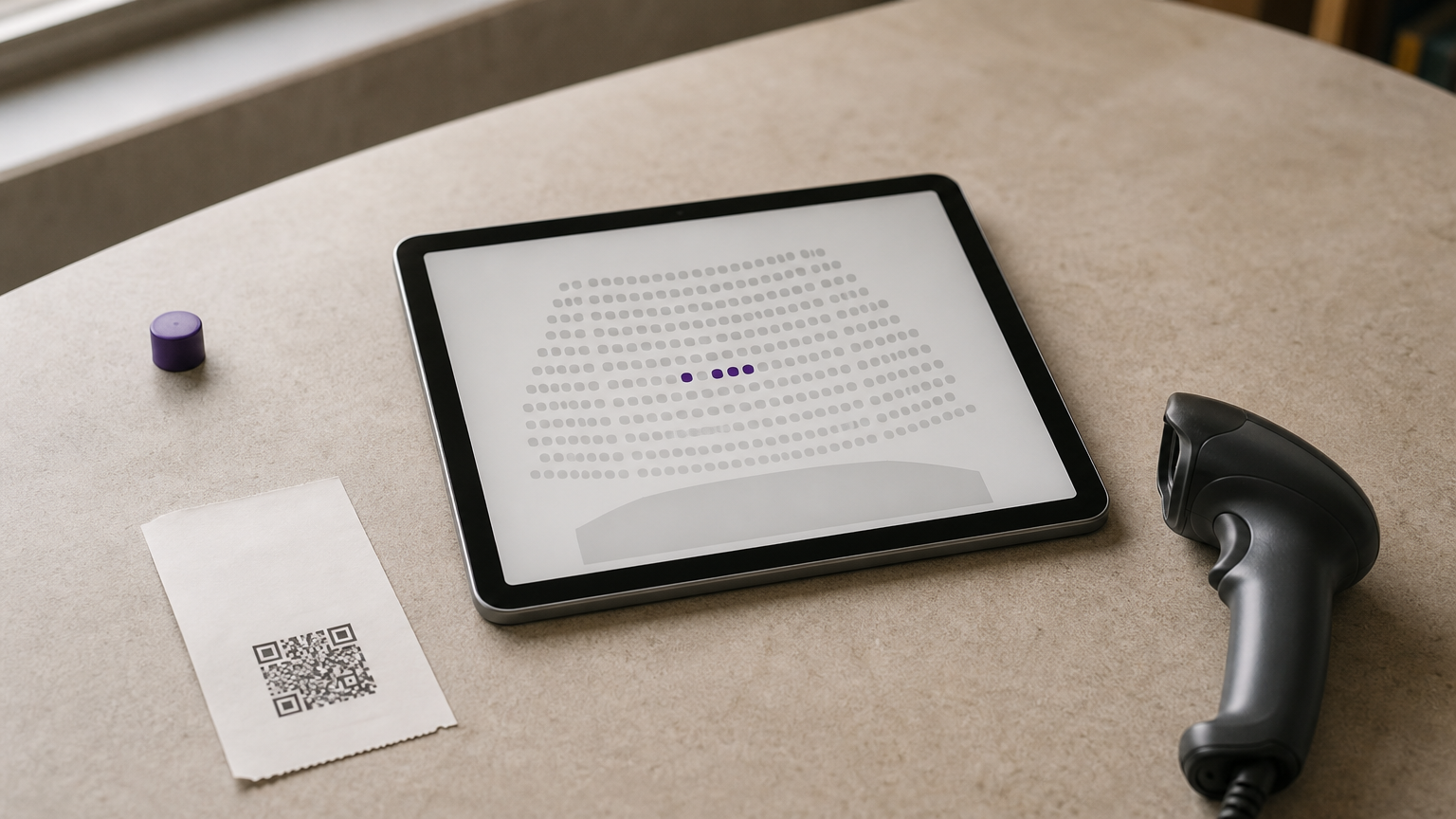
For seated events you can draw custom seating charts and sell reserved seats. A free check-in app handles entry on the day. That makes it a practical option for theatre nights, dinners and ticketed screenings where every seat has a number.
Pricing and fees
Ticket Tailor charges a flat fee per ticket instead of a percentage. This means it never takes a cut of a high ticket price. Prices are in dollars, so confirm what applies to your country and payment setup.
- Pay as you go: $0.65 per ticket plus payment processing.
- Prepaid credits: a published range of $0.70 down to $0.34 per ticket, depending on bundle size.
- Large volumes: custom quotes above 20,000 credits.
Who it suits
It suits events with higher-priced tickets or seating, where a flat per-ticket fee stays small next to the price. Organizers who want predictable costs and a clean buying page tend to like it.
It is a weaker fit for very cheap tickets, where a flat fee becomes a large share. Confirm that it supports your currency and payout bank before building a launch on it.
Ticket Tailor’s flat per-ticket fee rewards pricier and seated events, and punishes cheap tickets.
7. TicketSource
How it works
TicketSource is built for theatres, schools, museums, sports events and local performances. You set up an event quickly and sell general admission or allocated seating. Online and in-person sales draw from one inventory, which prevents double booking.
You can embed ticket sales on your own website and issue e-tickets, mobile tickets or printed tickets with QR codes. An interactive seating plan designer lets you recreate your venue so buyers pick exact seats. There is a basic discovery page, but the tool assumes you already have demand.
Pricing and fees
Events with free tickets cost nothing. For paid tickets, the booking fee can be passed to the buyer, which keeps the platform free for the organizer. Fees are in dollars, so check how they apply where you are.
- Paid tickets: 3.5% + $0.99 per ticket, including payment processing.
- With your own Stripe account: $0.99 per ticket plus Stripe’s standard fees.
- Free events: no cost.
Who it suits
TicketSource suits venues, schools and local shows with a loyal audience and a need for a reliable box office. Seated performances with phone or door sales are its home turf.
It is not a growth tool, so expect to promote the event yourself. Before choosing it, confirm that it supports payouts and payments in your country.
TicketSource works as a dependable box office for seated local shows, not as a way to find new buyers.
Event ticketing platforms compared and how to choose
Fees side by side
The table sets the seven options against each other on entry cost, fee and best use. Dollar figures are the published rates of each platform, and Eventbrite’s figure is for the United States.
| Platform | Entry cost | Fee on paid tickets | Best for |
|---|---|---|---|
| Pi-Square | ₹0 plan, Pro ₹300/month | Plan-based, gateway about 2% | WhatsApp-led events in India |
| Townscript | Free to start, no monthly fee | About 2% + fixed amount per ticket | Regional workshops, sports |
| Eventbrite | Free to create events | US: 3.7% + $1.79, plus 2.9% processing | Public events needing discovery |
| Luma | Free plan | 5% on free plan, none from $69/month | Community meetups |
| Zoho Backstage | Free plan, paid from $99/month | 0% commission | Multi-session conferences |
| Ticket Tailor | Pay as you go | $0.65 per ticket plus processing | Seated events, higher prices |
| TicketSource | Free for free events | 3.5% + $0.99, or $0.99 with own Stripe | Venues and local shows |
A worked example for 100 tickets
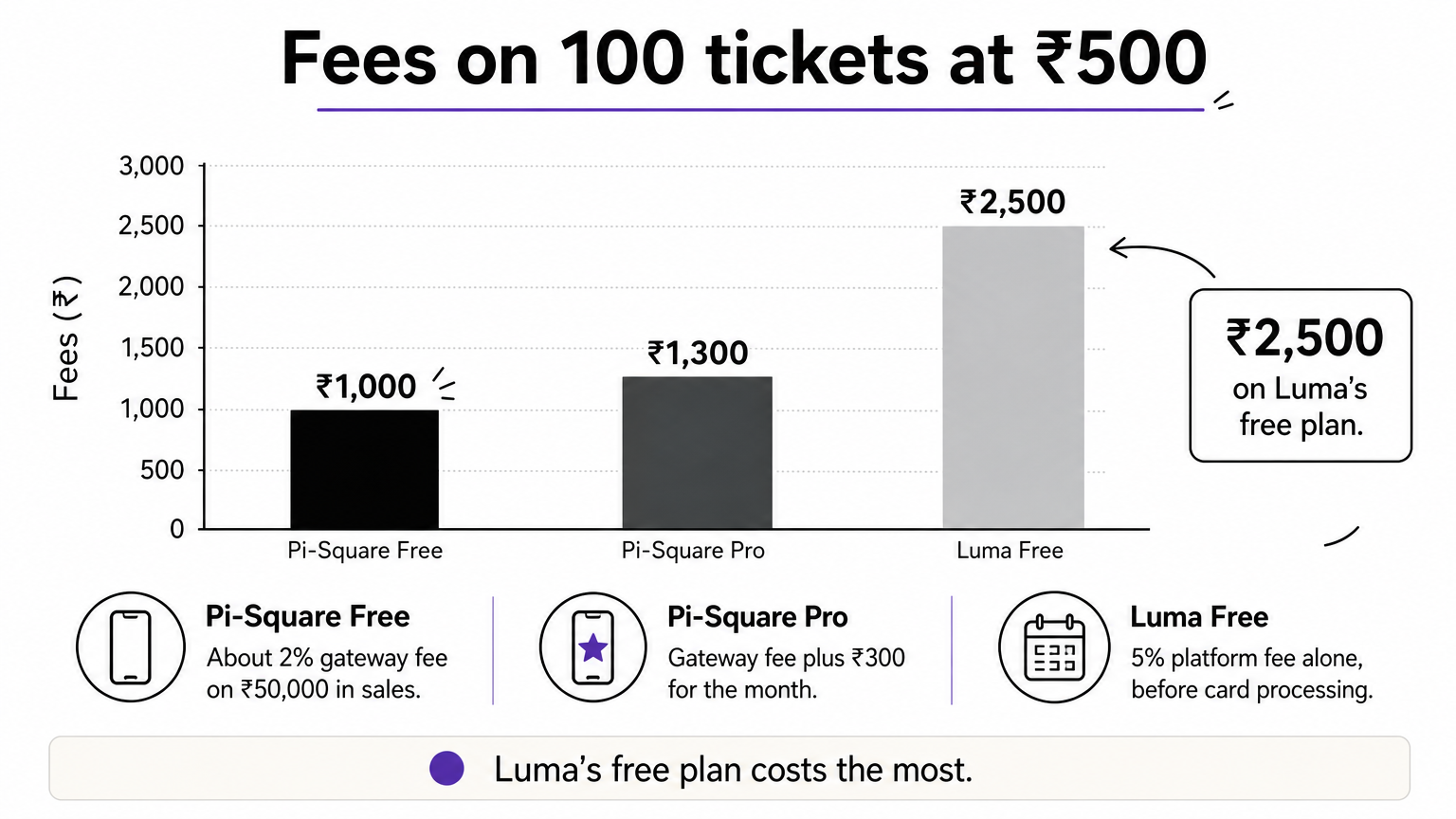
Say you sell 100 tickets at ₹500, which is ₹50,000 in sales. On Pi-Square’s free plan the gateway fee of about 2% comes to roughly ₹1,000, and you stay within the 100-order limit. On Pro, add ₹300 for the month, so about ₹1,300. On Luma’s free plan the 5% platform fee alone is ₹2,500, before card processing.
The same math explains why flat fees hurt on cheap tickets. A ₹10 fee is 2% of a ₹500 ticket but 10% of a ₹100 ticket. For a free event, a free event ticketing platform really is free on TicketSource and Eventbrite, which charge no fee per free ticket.
Four checks before you pick
Run your event through these checks before you sign up.
- Ticket price versus fee model. Cheap tickets favor percentage fees, expensive tickets favor flat fees.
- How your buyers pay. Confirm UPI, cards and any wallet your crowd uses.
- Seating and entry. If you need seat maps or gate scanning, shortlist Ticket Tailor or TicketSource.
- Payout timing. Some platforms release money only after the event, which hurts if you owe a venue deposit.
Compare platforms on what you would pay for your own ticket price and volume, not on the headline “free”.
Pick the platform that fits your tickets
The right event ticketing platform depends on your ticket price, where your buyers are and what happens on the day. Eventbrite helps when you need discovery. Townscript fits regional events. Luma is a quick free start for community events. Zoho Backstage handles multi-session conferences, and Ticket Tailor and TicketSource handle seated shows.
If you sell mostly on WhatsApp and want ticket sales, add-ons, advance payments and invoices in one link, start small and test it with a real event. You can create your event page free with Pi-Square and upgrade only if your order volume grows.